
The problem nobody talks about
Every tutorial on building with AI shows you the happy path: call the API, get a response, render it. Ship it.
But here's what actually happens when you're building AI features for real:
You write integration tests — they call OpenAI. That's real money on every test run. Your CI pipeline runs 20 times a day? That's 20× your token bill and you haven't even shipped a feature yet.
Then there's the debugging loop. Something breaks in your response parsing logic. You tweak the code, hit the API, wait 3 seconds, read the response, realize the bug is elsewhere, tweak again. Every single iteration costs tokens and adds latency. You're paying to debug your own code, not even the AI part.
And the worst part? AI responses are non-deterministic. Your test passes today, fails tomorrow, because the model decided to phrase something differently. Your CI goes red for no reason. You re-run it and it's green. Nobody trusts the test suite anymore.
We hit this exact wall while building ModelRiver. We were integrating multiple AI providers, and every debug cycle meant burning tokens across OpenAI, Anthropic and others, sometimes simultaneously. The cost wasn't just financial. It was the constant uncertainty of not knowing whether a failure was our code, the model or the network.
So we built something to fix it.
What we built
We added a feature called Test Mode.
The idea is dead simple: when a workflow is in Test Mode, it returns your pre-defined sample data shaped exactly the way your app expects without ever hitting OpenAI, Anthropic or any provider. Zero tokens consumed, zero AI provider charges, instant response.
Here's what that looks like in practice.
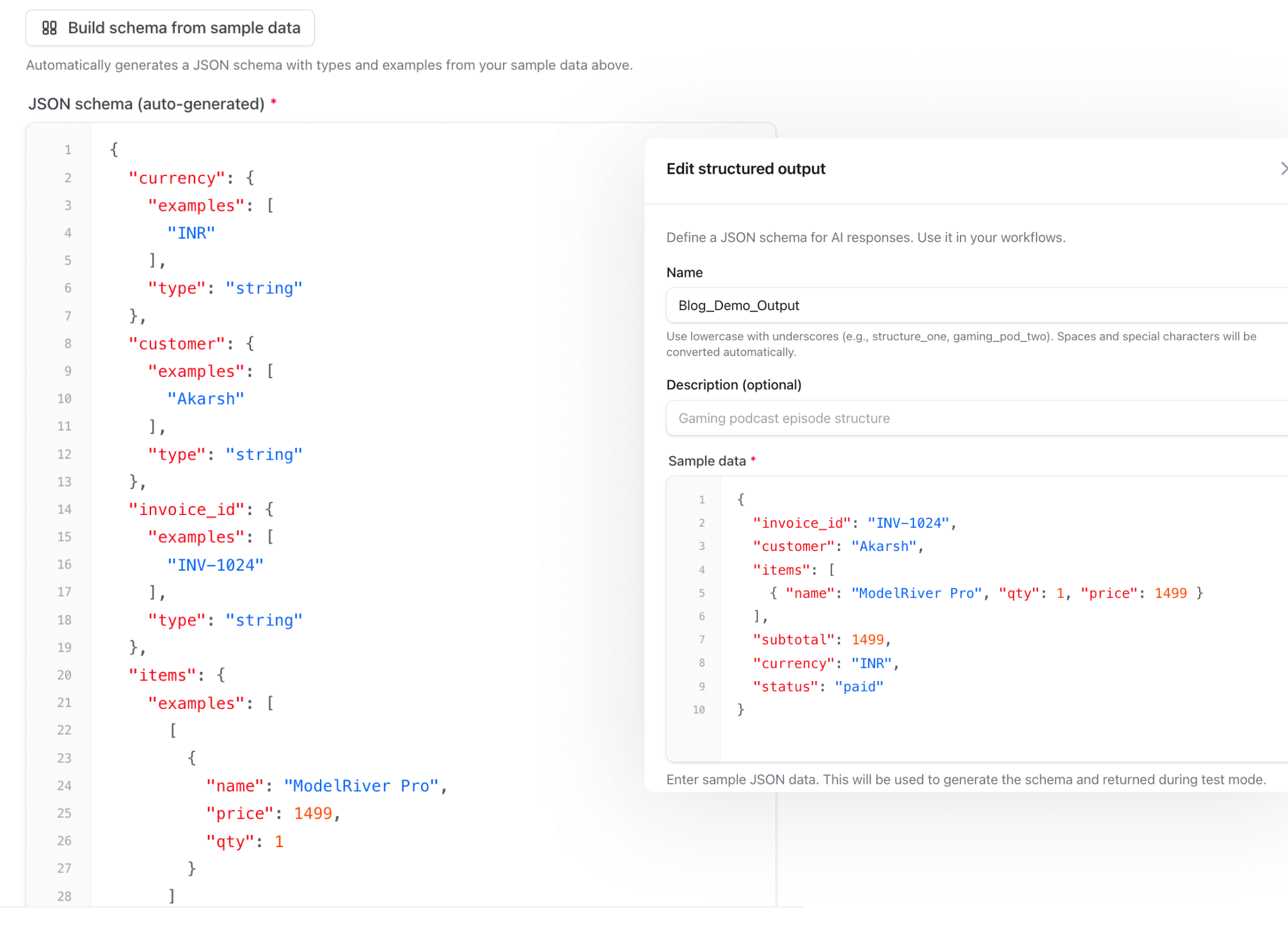
You define your expected output once
In your structured output, you provide sample data alongside the JSON schema. This is the data that Test Mode will return:
Here's what this looks like in the ModelRiver dashboard — your schema on the left, sample data on the right:
You flip the workflow to Test Mode
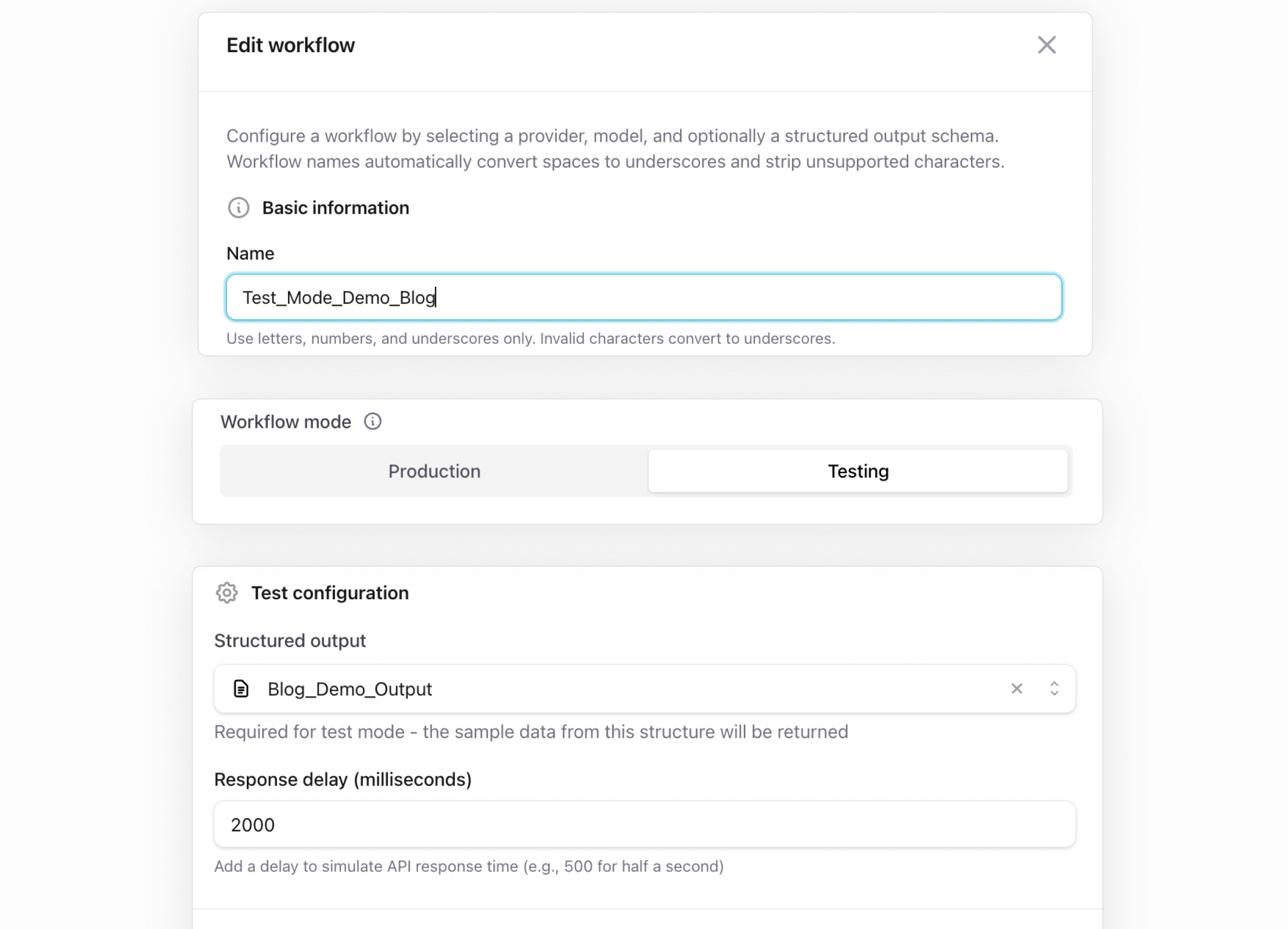
Every workflow in ModelRiver has a mode: Production or Testing. When set to Testing, the workflow skips the entire AI provider pipeline.
You still use your ModelRiver API key (auth and request logging all run as normal), but you don't need any AI provider credentials configured. Just the structured output with your sample data.
Your API calls work exactly the same
Your code doesn't change at all. Same endpoint, same payload, same auth:
The response comes back with your sample data:
And here's the actual Playground showing the result — notice the provider is "Testing", tokens used is 0:
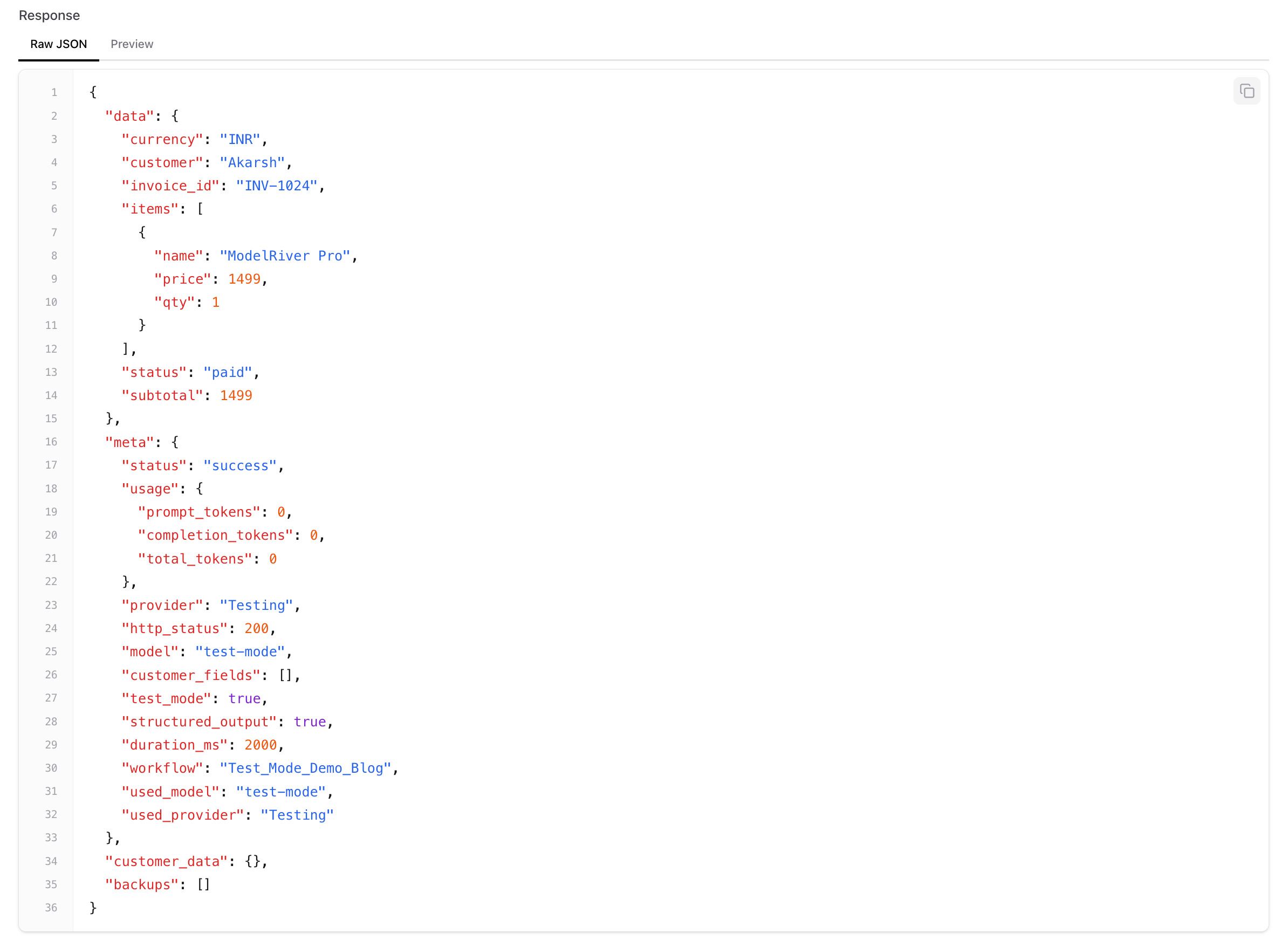
Your application code doesn't change. Your frontend doesn't change. The response shape is identical to what a real provider would return. The only difference: no AI provider is called, no tokens are spent, and you get the same deterministic response every time.
Why this actually matters
CI/CD that doesn't burn money
We run our integration tests on every push. Before Test Mode, that meant either mocking the AI layer (which doesn't actually test the real flow) or paying for API calls on every CI run (which means your token bill scales with your commit frequency — not the kind of scale you want).
With Test Mode, our CI tests hit the real ModelRiver API, go through the real authentication and routing pipeline, and get back predictable data. The only thing skipped is the external AI provider call. Everything else — auth, request logging, response formatting — all exercised for real.
Simulating latency
One thing that caught us off guard early on: our frontend loading states looked fine in dev but janky in production because real GPT-4 calls take 2–5 seconds. We were testing against instant responses and shipping UIs that hadn't been tested under real latency.
Test Mode has a configurable response delay. Set it to 2000ms and your workflow responds after roughly a 2-second pause — close enough to simulate what a real AI call feels like. This lets you test loading states, timeout handling, and retry logic properly. Without spending a single token.
Unblocking frontend development
This one's been huge for us. Your frontend team doesn't need to wait for the AI pipeline to be production-ready. They can start building against Test Mode workflows immediately.
The sample data acts as a contract: "This is the shape of the response. Build against it." When the AI pipeline is ready, flip the toggle to Production. The frontend code stays identical.
Async and backend pipeline workflows too
Test Mode works with ModelRiver's async API as well. Fire an async request, and the test response flows through the same WebSocket delivery pipeline — including reconnection after page refresh. If you have backend pipeline workflows with backend callbacks, those get triggered too, with the sample data as the payload.
This means you can test your entire real-time pipeline end-to-end — webhooks, callbacks, WebSocket delivery — without a single provider call.
What Test Mode doesn't do
A few honest boundaries:
- It doesn't test your prompts. The AI model is never called, so you won't know if your prompt produces good results. Test Mode is for testing your application logic, not your prompt engineering.
- It doesn't test failover. Since no provider is called, the backup model chain isn't exercised. For that, use Production mode with a cheaper model.
- Responses are static. The same sample data comes back every time. That's the whole point — determinism — but it means you won't catch edge cases in output variability.
The bigger picture
Test Mode is one piece of something we care a lot about: making AI infrastructure as testable and predictable as any other part of your stack.
Right now, most AI integrations are treated like black boxes. You fire a request and hope for the best. If something breaks, you check logs and squint at the provider dashboard. We've been there, and it's not a great developer experience.
We think this can be better. Real observability. Real testing. Real CI support. The kind of rigor we'd expect from databases, queues, and APIs — but applied to AI.
If you're building AI features and tired of burning tokens on test runs and debugging, give Test Mode a try. It's free to get started, and the only AI provider costs kick in when you switch workflows to production.
We'd love to hear how you're handling AI testing in your workflow — what works, what's painful, what's missing. We're @modelriverai on X, or drop us a comment if you see this on HN.