What is a backend pipeline?
A backend pipeline decouples AI generation from response delivery. Instead of waiting synchronously for an AI response, you fire an async request and let ModelRiver notify your backend when the result is ready. Your backend then runs custom logic: database writes, API calls, enrichment, validation: and calls back to ModelRiver, which delivers the final result to your frontend via WebSocket.
The three-step flow:
- AI generates: Your app calls
POST /v1/ai/asyncwith a workflow that has anevent_name. ModelRiver processes the AI request in the background. - Your backend processes: ModelRiver delivers the AI result to your webhook endpoint. Your code executes custom business logic (save to database, call external APIs, validate, enrich).
- ModelRiver delivers: Your backend calls the
callback_urlwith the enriched data. ModelRiver broadcasts the final result to connected WebSocket clients in real time.
For multi-step pipelines (up to 6 events with optional linked workflows between backend steps), see Multi-step pipelines.
Why use a backend pipeline?
| Benefit | Description |
|---|---|
| Non-blocking | Your frontend never waits for AI + backend processing. Users see instant "processing" states. |
| Custom logic before delivery | Validate AI output, enrich with database data, trigger side effects: all before the user sees the result. |
| Reliable delivery | ModelRiver retries failed webhook deliveries automatically (up to 3 attempts) and times out pipelines whose callback never arrives. |
| Observable | Every step is logged in the Timeline: AI request, webhook delivery, backend callback. |
| Scalable | Process thousands of concurrent AI requests without blocking web servers. |
How it works
┌──────────┐ POST /v1/ai/async ┌──────────────┐│ Your │ ──────────────────────────▶ │ ModelRiver ││ App │ { workflow, messages } │ (AI engine) ││ │ ◀────────────────────────── │ ││ │ { channel_id, ws_token } │ │└──────────┘ └──────┬───────┘ │ │ │ Connect WebSocket │ AI processes │ (ai_response:{project}:{channel}) │ in background │ ▼ │ ┌──────────────┐ │ │ Webhook │ │ │ delivery │ │ └──────┬───────┘ │ │ │ ▼ │ ┌──────────────┐ │ │ Your │ │ │ Backend │ │ │ (webhook) │ │ └──────┬───────┘ │ │ │ │ POST callback_url │ │ { data, task_id } │ ▼ │ ┌──────────────┐ │ WebSocket push │ ModelRiver │ │ ◀──────────────────────────────── │ (callback) │ │ { status: "completed", data } └──────────────┘ ▼┌──────────┐│ Frontend │ Renders final result└──────────┘Quick start
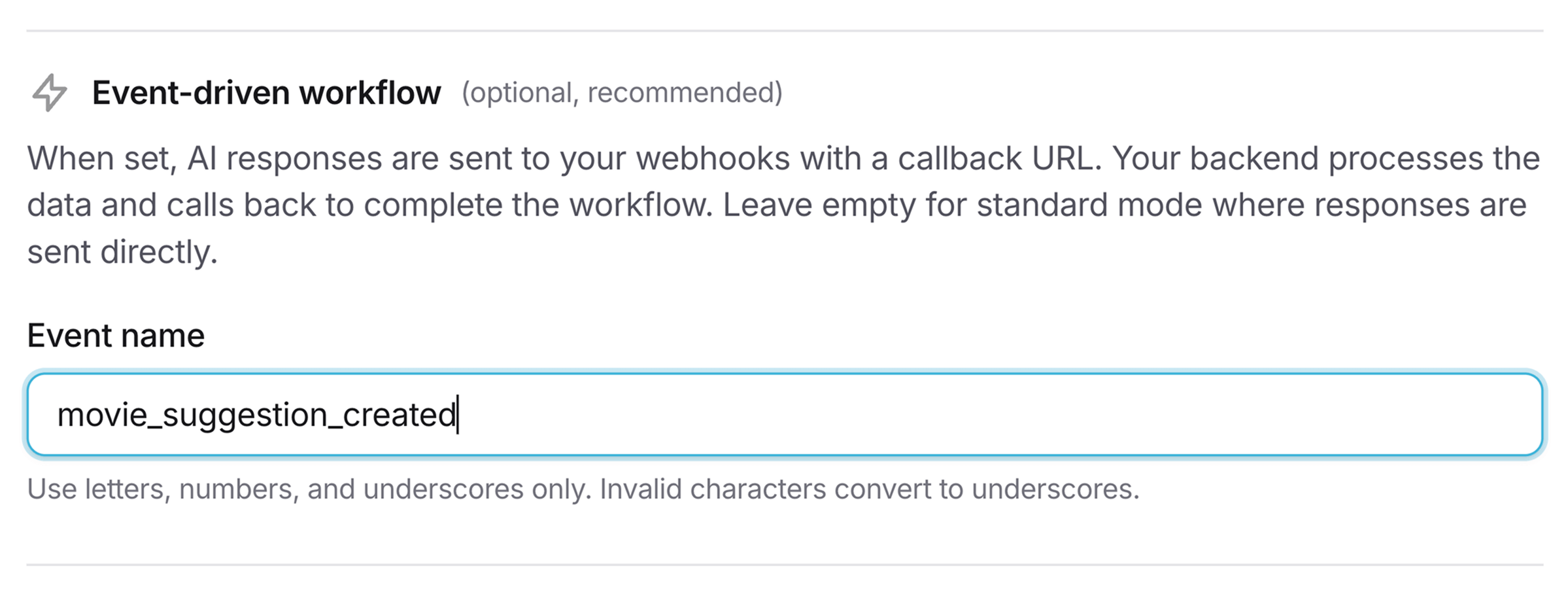
1. Create a workflow with an event name
In the ModelRiver console, create a workflow and set the Event name field. This tells ModelRiver to use the backend pipeline flow instead of returning the AI response directly.
2. Send an async request
curl -X POST https://api.modelriver.com/v1/ai/async \ -H "Authorization: Bearer mr_live_your_key" \ -H "Content-Type: application/json" \ -d '{ "model": "content_generator", "messages": [ {"role": "user", "content": "Generate a product description for wireless headphones"} ], "metadata": { "product_id": "prod_123", "category": "electronics" } }'Response:
1{2 "message": "success",3 "status": "pending",4 "channel_id": "550e8400-e29b-41d4-a716-446655440000",5 "ws_token": "AbC123XyZ...one-time-token",6 "websocket_url": "wss://api.modelriver.com/socket",7 "websocket_channel": "ai_response:proj_xyz:550e8400-e29b-41d4-a716-446655440000"8}3. Receive the webhook
ModelRiver sends the AI result to your registered webhook endpoint:
1{2 "callback_url": "https://api.modelriver.com/v1/callback/550e8400-e29b-41d4-a716-446655440000",3 "channel_id": "550e8400-e29b-41d4-a716-446655440000",4 "data": {5 "type": "task.ai_generated",6 "event": "content_ready",7 "channel_id": "550e8400-e29b-41d4-a716-446655440000",8 "step_index": 0,9 "total_steps": 1,10 "step_type": "backend",11 "pipeline": {12 "workflow_id": "7c9e6679-7425-40de-944b-e07fc1f90ae7",13 "workflow_name": "content_generator",14 "step_name": "content_ready"15 },16 "ai_response": {17 "status": "pending",18 "data": {19 "title": "ProSound X1 Wireless Headphones",20 "description": "Experience crystal-clear audio...",21 "features": ["Active noise cancellation", "40-hour battery"]22 },23 "meta": {24 "used_provider": "openai",25 "used_model": "gpt-4o"26 }27 },28 "callback_url": "https://api.modelriver.com/v1/callback/550e8400-e29b-41d4-a716-446655440000",29 "callback_required": true,30 "customer_data": {31 "metadata.product_id": "prod_123",32 "metadata.category": "electronics"33 }34 },35 "timestamp": 177114420036}The event payload is under data. The customer_data keys are the field paths configured on the workflow.
4. Process and call back
Your backend processes the AI output and calls the callback_url:
1// POST {callback_url}2await fetch(callbackUrl, {3 method: "POST",4 headers: {5 "Authorization": `Bearer ${process.env.MODELRIVER_API_KEY}`,6 "Content-Type": "application/json",7 },8 body: JSON.stringify({9 data: {10 ...aiResponse.data,11 slug: generateSlug(aiResponse.data.title),12 seo_keywords: await generateKeywords(aiResponse.data),13 saved_at: new Date().toISOString(),14 },15 task_id: `product_${productId}`,16 }),17});5. Frontend receives the final result
The connected WebSocket client receives the enriched response:
1{2 "status": "completed",3 "data": {4 "title": "ProSound X1 Wireless Headphones",5 "description": "Experience crystal-clear audio...",6 "features": ["Active noise cancellation", "40-hour battery"],7 "slug": "prosound-x1-wireless-headphones",8 "seo_keywords": ["wireless headphones", "noise cancelling"],9 "saved_at": "2026-02-15T08:30:02.000Z"10 },11 "customer_data": {12 "metadata.product_id": "prod_123",13 "metadata.category": "electronics"14 }15}Webhook payload reference
Headers
| Header | Description |
|---|---|
content-type | application/json |
x-modelriver-signature | HMAC-SHA256 signature (lowercase hex) for verification |
x-modelriver-timestamp | Unix timestamp (seconds) of the delivery attempt |
x-modelriver-webhook-id | Webhook endpoint ID |
Envelope fields
| Field | Type | Description |
|---|---|---|
callback_url | string | URL to POST your processed result back to ModelRiver |
channel_id | string | Unique request identifier |
data | object | The event payload (fields below) |
timestamp | integer | Unix timestamp (seconds) |
Event payload fields (data)
| Field | Type | Description |
|---|---|---|
type | string | Always "task.ai_generated" for backend pipeline workflows |
event | string | Your custom event name (the current step's name) |
channel_id | string | Unique request identifier |
step_index | integer | Zero-based index of the current pipeline step |
total_steps | integer | Number of steps in the pipeline |
step_type | string | "backend" for a step your backend handles |
pipeline | object | workflow_id, workflow_name, and step_name |
ai_response | object | The AI-generated data in ai_response.data, with status: "pending" and the provider/model details in meta |
callback_url | string | URL to POST your processed result back to ModelRiver |
callback_required | boolean | true: ModelRiver is waiting for your callback |
customer_data | object | Cached fields from your request, keyed by field path |
Callback API
After processing the AI response, POST your enriched data to the callback_url.
Headers:
Authorization: Bearer {your_api_key}Content-Type: application/json
Success payload:
1{2 "data": {3 "your_enriched_fields": "..."4 },5 "task_id": "optional_tracking_id",6 "metadata": {7 "processing_time_ms": 2348 }9}data must be a JSON object. ModelRiver merges it over the AI output, so your fields are added to (or replace) the AI fields of the same name, and the merged result is what your frontend receives. task_id and metadata are passed through to the final WebSocket message as task_id and callback_metadata.
Reporting a failure: The callback has no separate error mode. Top-level fields such as error or message are ignored, and the callback is treated as a success: the pipeline continues, and your frontend receives the final result with status: "completed". To tell your frontend that backend processing failed, put the failure inside data and handle it in your UI:
1{2 "data": {3 "processing_status": "failed",4 "processing_error": "Database connection timeout"5 }6}Callback responses:
| Status | error | When |
|---|---|---|
200 | (none) | Callback accepted. A repeated callback for a step that was already received returns 200 again without reprocessing it. |
400 | invalid_payload | data is not a JSON object (for example, an array or a string) |
400 | invalid_channel_id | The channel ID in the URL is not a valid UUID |
401 | missing_api_key | No API key was provided |
403 | forbidden | The API key belongs to a different project than the request |
404 | channel_not_found | The channel doesn't exist, has already completed, or has timed out |
409 | callback_in_progress | Another callback for the same step is still being processed |
409 | step_index_mismatch | The callback is for a pipeline step that has already advanced |
410 | channel_expired | The callback arrived after the channel expired |
Timeout: If your backend doesn't call back within 10 minutes, ModelRiver sends a callback_timeout error to the WebSocket channel and records the backend callback as timed out in the request's timeline. The window restarts each time a multi-step pipeline advances to a new step. Callbacks sent after the timeout are rejected.
Signature verification
Always verify the x-modelriver-signature header to ensure webhook payloads are genuinely from ModelRiver. The signature is the hex HMAC-SHA256, keyed with your webhook secret, of <x-modelriver-timestamp>.<data>, where <data> is the exact JSON text of the body's data value. Take that text from the raw request body (after the first "data": and before the last ,"timestamp":). Don't parse the body and re-serialize data: re-encoding changes number formatting and escaping, so the signature won't match.
1const crypto = require("crypto");2 3// rawBody: the unparsed request body as a string (e.g. from express.raw())4function verifySignature(rawBody, timestamp, signature, secret) {5 const start = rawBody.indexOf('"data":') + '"data":'.length;6 const end = rawBody.lastIndexOf(',"timestamp":');7 if (start < 7 || end < start) return false;8 9 const expected = crypto10 .createHmac("sha256", secret)11 .update(`${timestamp}.${rawBody.slice(start, end)}`)12 .digest("hex");13 14 return (15 signature.length === expected.length &&16 crypto.timingSafeEqual(Buffer.from(signature), Buffer.from(expected))17 );18}Also reject deliveries whose x-modelriver-timestamp is more than about 5 minutes old. Every retry gets a fresh timestamp and signature, so this doesn't block legitimate retries.
Use cases
| Use case | Event name | What your backend does |
|---|---|---|
| Content generation | content_ready | Save to CMS, generate SEO metadata, create thumbnails |
| Code review | review_complete | Post comments to GitHub PR, update ticket status |
| Data extraction | entities_extracted | Validate against schema, write to database, trigger downstream workflows |
| Customer support | ticket_classified | Route to correct team, update CRM, send notification |
| Document processing | summary_generated | Store in knowledge base, index for search, notify stakeholders |
Backend framework guides
Step-by-step guides for implementing backend pipeline in your framework:
| Framework | Language | Guide |
|---|---|---|
| Next.js | TypeScript | View guide → |
| Nuxt.js | TypeScript | View guide → |
| Django | Python | View guide → |
| FastAPI | Python | View guide → |
| Laravel | PHP | View guide → |
| Rails | Ruby | View guide → |
| Phoenix | Elixir | View guide → |
| Spring Boot | Java | View guide → |
| .NET | C# | View guide → |
Serverless database guides
Use backend pipeline with serverless databases to build fully reactive data pipelines:
| Platform | Guide |
|---|---|
| Supabase | View guide → |
| PlanetScale | View guide → |
| Neon | View guide → |
| Convex | View guide → |
Next steps
- Webhooks: Full webhook configuration and management
- Client SDK: Frontend WebSocket integration
- Observability: Monitor the entire backend pipeline flow
- API endpoints: Async request reference