
Most support tools ask you to move in. Your help articles, your customers' conversations and the keys to your store end up on someone else's servers, billed per seat or per resolution.
Desk goes the other way. It's an open-source support app you run yourself: a chat widget that answers from your help center, the help center itself, tickets your team answers by email, and a dashboard where your team picks up the chats the AI shouldn't handle alone. It's one Node.js process and a SQLite file, MIT-licensed. See Desk, or go straight to the docs.
What a visitor sees
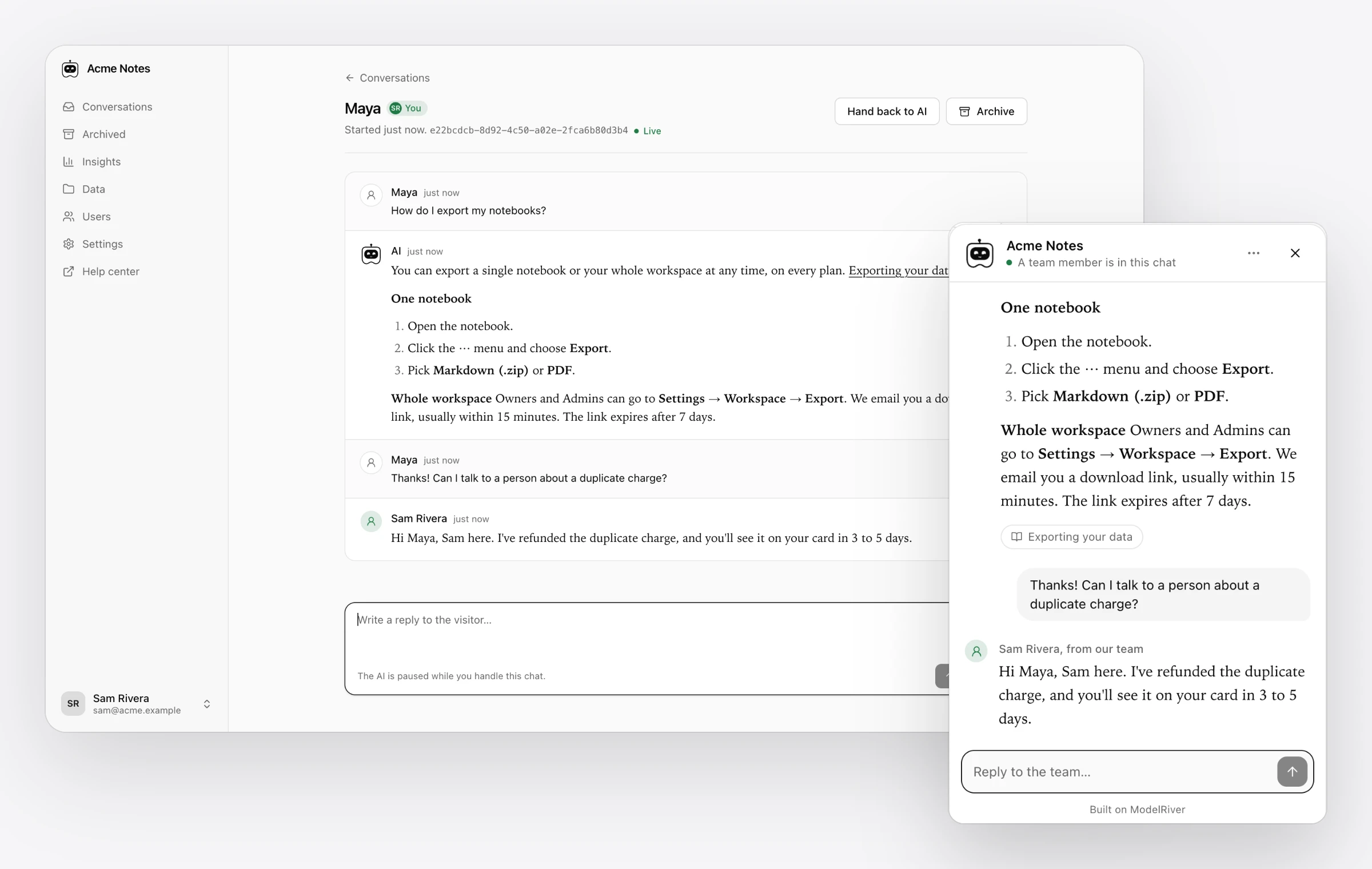
A visitor asks a question. Desk searches your articles and private notes, picks the best passages, and the answer streams into the widget as it's written, with links to the articles it used.
A small bot at the top of the chat shows what's happening: online while it waits, listening while the visitor types, thinking while it writes, solved once it has answered, and stepping aside when it passes the chat to a person.
When a visitor asks for a person, or the AI can't answer, the chat goes to your team, and the AI stays quiet. Anyone can hand it back later, and the AI picks up with the whole conversation in view.
When no one is around: tickets
Some questions can't be settled in one chat, and sometimes nobody is free to take one. For those, Desk has tickets that your team answers by email, and a customer portal where customers follow them.
- A ticket can start anywhere. A visitor raises one from the chat or the portal, your team turns a chat into a ticket, or someone opens one by hand. Each ticket gets a short reference like
#K7F3Q9, a full history and internal notes your customer never sees. - Replies go out by email. A customer's emails about a ticket stay in one thread in their mail app, and an email that fails to send is retried over the next few hours instead of being lost.
- Draft with AI writes a reply from your help articles and private notes, for your team to check and edit before sending.
- The customer portal at
/customer-portallets customers sign in with a 6-digit email code to read replies, answer them and raise new tickets. Every reply email links straight to its ticket. - Two switches for quiet hours. Turn off Visitors can talk with a person and the assistant says no one is available right now and offers a ticket instead. Turn off Customers can raise tickets to pause new ones while existing tickets can still be answered.
Solved tickets are deleted 90 days after they're solved.
"Where's my order?" gets a real answer
Help articles explain how things work. They can't tell a customer where their order is or when their plan renews, and those are the questions people actually ask.
So Desk has read-only integrations with Shopify, Stripe and Cal.com, plus a Custom HTTP connector for your own API. An admin turns one on by pasting a key under Dashboard → Integrations.
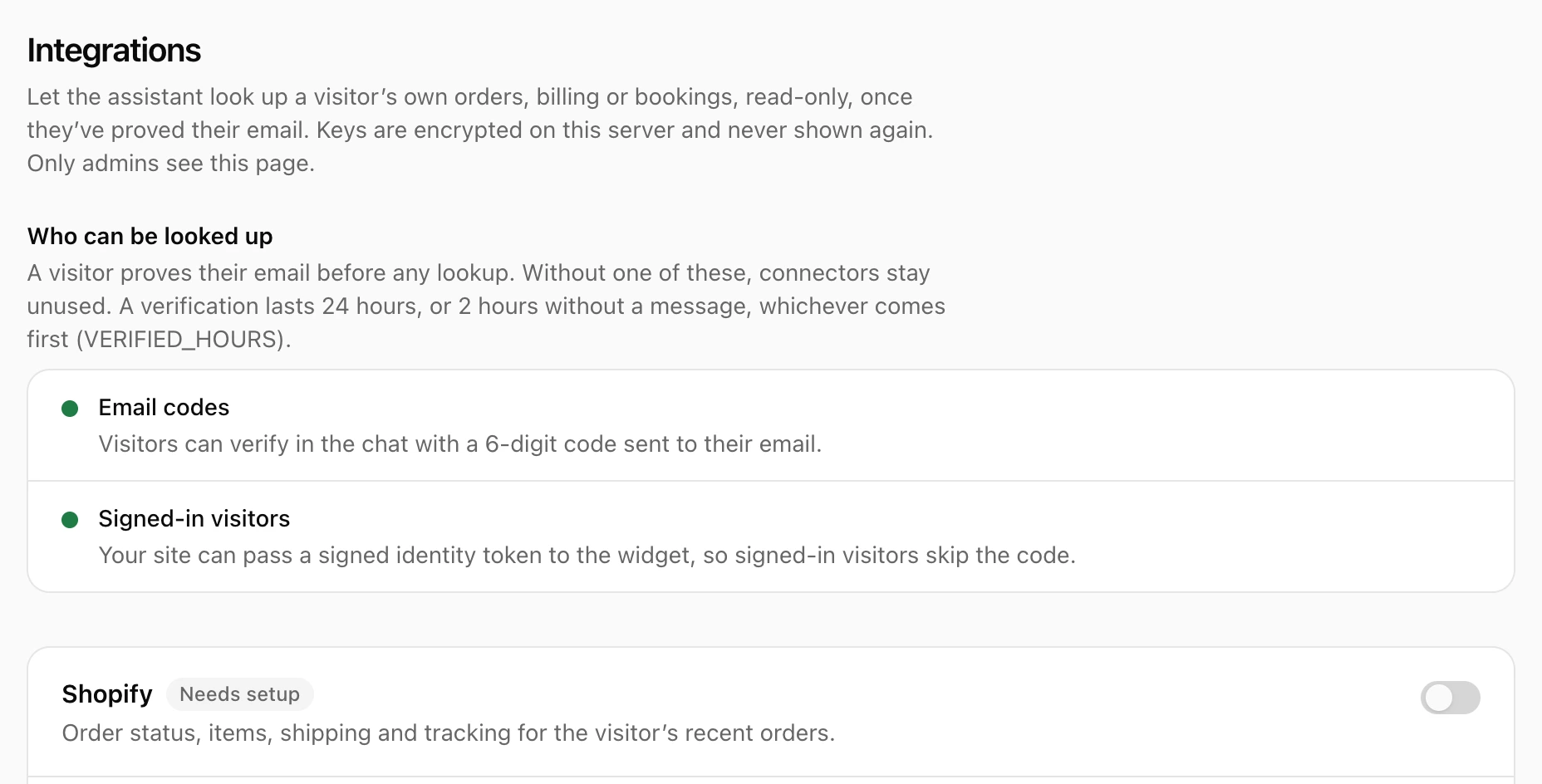
We were careful about who sees what:
- The visitor proves their email first, with a 6-digit code, or with a signed token from your site if they're already signed in there. Lookups only ever use that verified email, so nobody can ask about someone else's orders. A verification lasts 24 hours, or 2 hours without a message.
- Read-only, enforced. A Shopify token with write access, or a full Stripe secret key, is refused. Refunds and changes get a link or go to your team.
- Keys stay on your server. They're encrypted and never shown again. Desk calls each service itself, and the model only sees a short, fixed set of fields for that turn: no addresses, phone numbers or card details.
- No extra AI call. Desk fetches the data before it asks the model, so an account answer costs the same as any other.
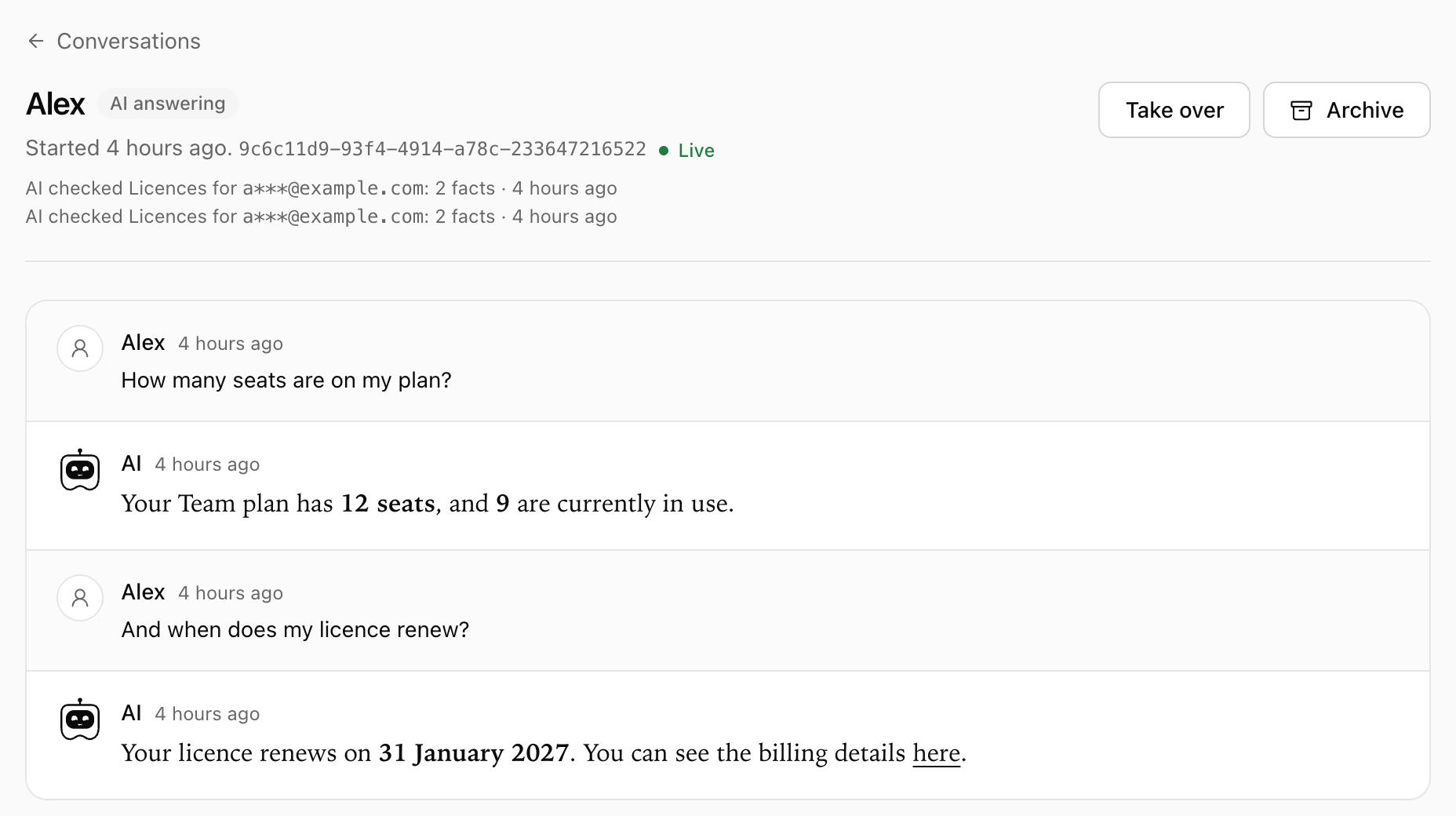
Every lookup is logged with a masked email, and your team sees it on the conversation. Here the Custom HTTP connector is pointed at a small demo API that returns a plan and a renewal date:
Drafts the AI never sees
A help article takes a few passes, and you don't want the assistant quoting the first one. Save draft keeps an article out of the help center, out of search and out of everything sent to the AI. Publish puts it live, after a confirmation that tells you where it will appear. Unpublish takes it back to draft without losing a word.
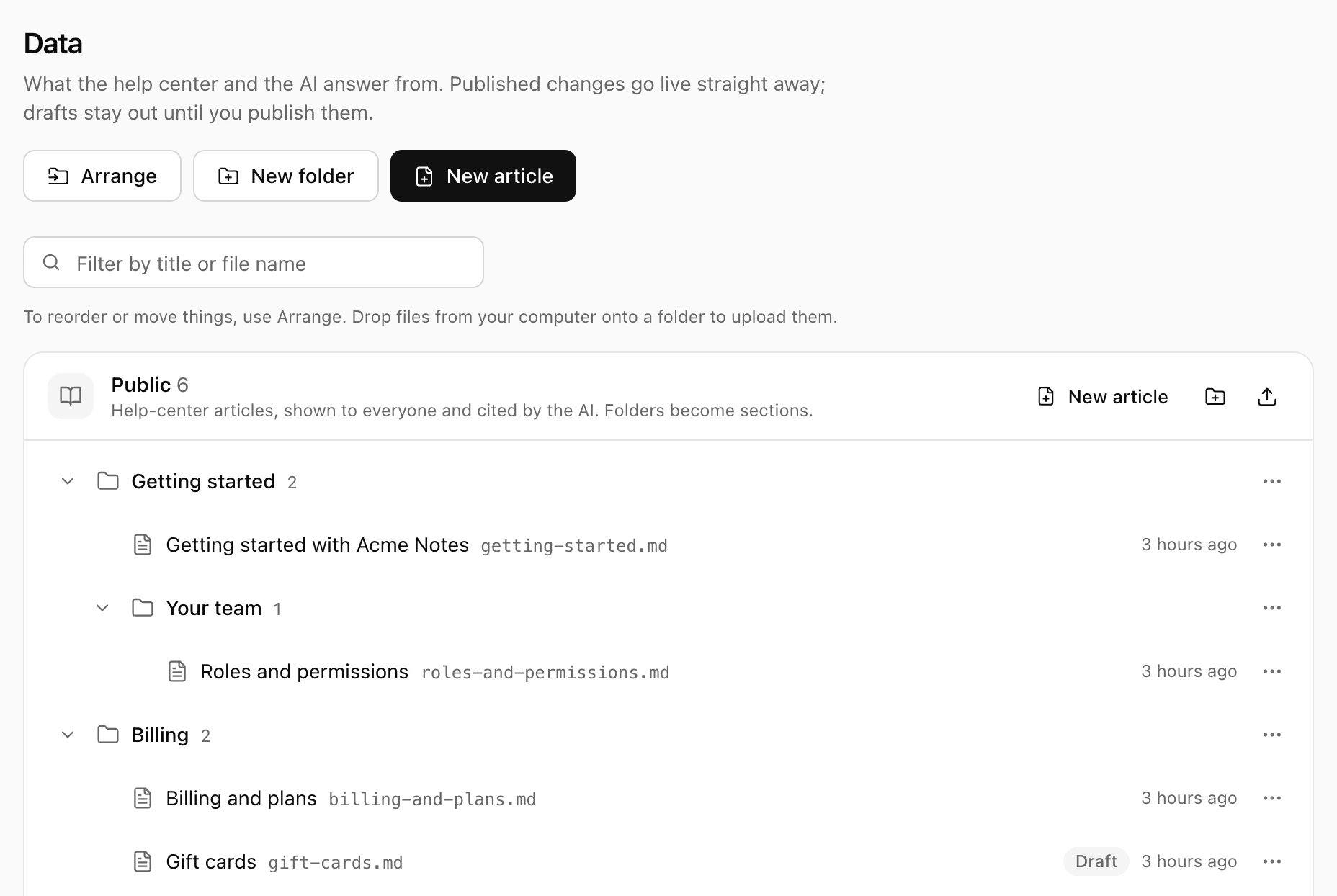
Private notes cover what the AI should know but never show, such as an escalation rule or a refund limit. They shape answers, but they're never quoted, cited or linked.
All of it lives under Dashboard → Knowledge. New uploads start as drafts, and you can publish or unpublish many articles at once. Top-level folders become collections with an icon and a short description, and the help center at /articles shows them as cards, with breadcrumbs, last-updated dates and a search window you open with ⌘K. Images in articles are stored on your own server, or in S3-compatible storage such as Cloudflare R2.
Make it yours
Settings → Appearance sets a logo for light and dark mode, one brand colour (Desk works out readable buttons, links and highlights for both modes), fonts, corner style, and the home page's heading and example question. Settings → SEO sets page titles, the home page's description and a favicon. Changes apply at once, without a restart.
Team members can add a profile picture, and it shows next to their replies in the chat. Visitors who want more room can expand the chat to a full page at /chat.
Small, because ModelRiver does the heavy lifting
Desk is also a reference app for ModelRiver. The parts that usually take months come from the platform:
- Streaming answers come from
POST /v1/ai/asyncand the client SDK. - Conversation history lives in a ModelRiver session. Desk keeps no copy of the messages; its own database only maps conversations to sessions.
- Live updates keep the widget and the dashboard in step as messages, takeovers and hand-backs happen.
- Models and fallbacks come from your workflow, so you can switch providers without touching Desk.
On the team side, the dashboard shows every conversation, who's handling it and who's waiting. Insights lists the questions your help center couldn't answer and the articles rated least helpful, so you know what to write next.
Try it
You need Node.js 26.12.1 or later and a ModelRiver API key.
Import the example workflow into the ModelRiver console, publish it, and open http://localhost:3000. The Desk docs cover configuration, each connector, and deploying behind HTTPS.
On an Ubuntu server, setup-server.sh also installs desk-update. sudo desk-update backs up your data, builds the new release next to the running one, switches over in a few seconds, and goes back to the previous version on its own if the new one doesn't start. See Updating Desk. The source and issues are on GitHub.
Rather not run it yourself? Talk to us and we'll set it up for you.