
Actually, use the other address
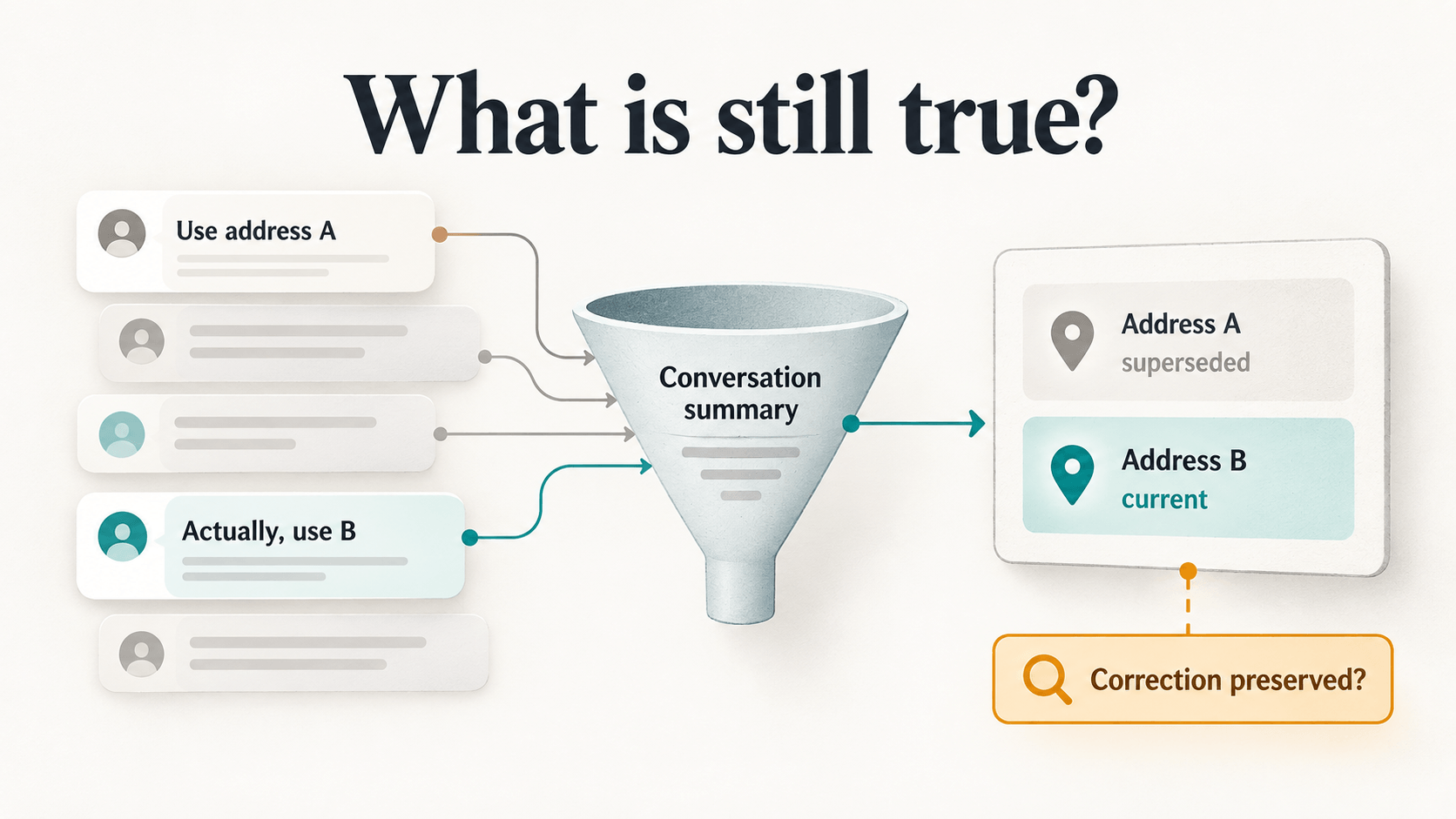
Consider a customer support chatbot that helps arrange a delivery. Early in the conversation, someone gives it an address. A few turns later, they correct it. The conversation moves on to delivery times, packaging, and a receipt. Then the customer asks, “Where are you sending it?”
The bot can remember both addresses and still get the answer wrong. The question is not whether the old address remains somewhere in its history. The question is whether it knows that the old one has been replaced.
Here is a small example. The conversation and responses below are illustrative; they are not results from a model run. We have not run a live comparison of the three strategies in this article. This is a debugging guide and a reproducible test protocol, rather than a report of measured results.
| Turn | Conversation |
|---|---|
| 1 | User: Send the sample package to 14 Lake Road, Pune. Assistant: I have the delivery address as 14 Lake Road, Pune. |
| 2 | User: Actually, use 82 Hill Street, Pune. The first address is outdated. Assistant: Understood. I’ll use 82 Hill Street, Pune. |
| 3 | User: Can it arrive on Friday? Assistant: I can help check Friday delivery options. |
| 4 | User: The package is a small box. Assistant: Got it: one small box. |
| 5 | User: Please include a printed invoice. Assistant: I’ll include a printed invoice in the request. |
| 6 | User: Can I track it later? Assistant: Yes, tracking can be shared once it is dispatched. |
| 7 | User: Use regular delivery if Friday costs extra. Assistant: I’ll note regular delivery as the preference if Friday has an extra charge. |
| 8 | User: The recipient will be at home after 5. Assistant: I’ll note that the recipient is available after 5. |
| 9 | User: What should I put on the label? Assistant: You can use the recipient’s name and delivery address. |
| 10 | User: Can you summarize the delivery details? Assistant: One small box, a printed invoice, and regular delivery if Friday costs extra. |
| 11 | User: Thanks. Assistant: You’re welcome. |
| 12 | User: Let’s continue. Assistant: All right. |
| Probe | User: Which address should the package go to? Assistant: Response to evaluate. |
The expected state is simple: 82 Hill Street is current; 14 Lake Road is superseded. But a summary that says “The customer discussed delivery to 14 Lake Road and 82 Hill Street” has retained both sentences while losing the decision.
That is the distinction this article explores. Good memory isn’t remembering more. It’s remembering what is still true.
A conversation is a sequence of state changes
Conversation history is a record of what people said. Application behavior depends on a smaller, changing set of facts: what is current, what was replaced, what is allowed, what is still pending, and what was merely guessed.
A chatbot that condenses a conversation into a fluent paragraph may preserve its general subject while erasing precisely these distinctions. “The user discussed sending an order” does not tell us whether sending was approved, held, or already completed. “The user is ordering for a business” is different from “the assistant guessed this might be a business order.”
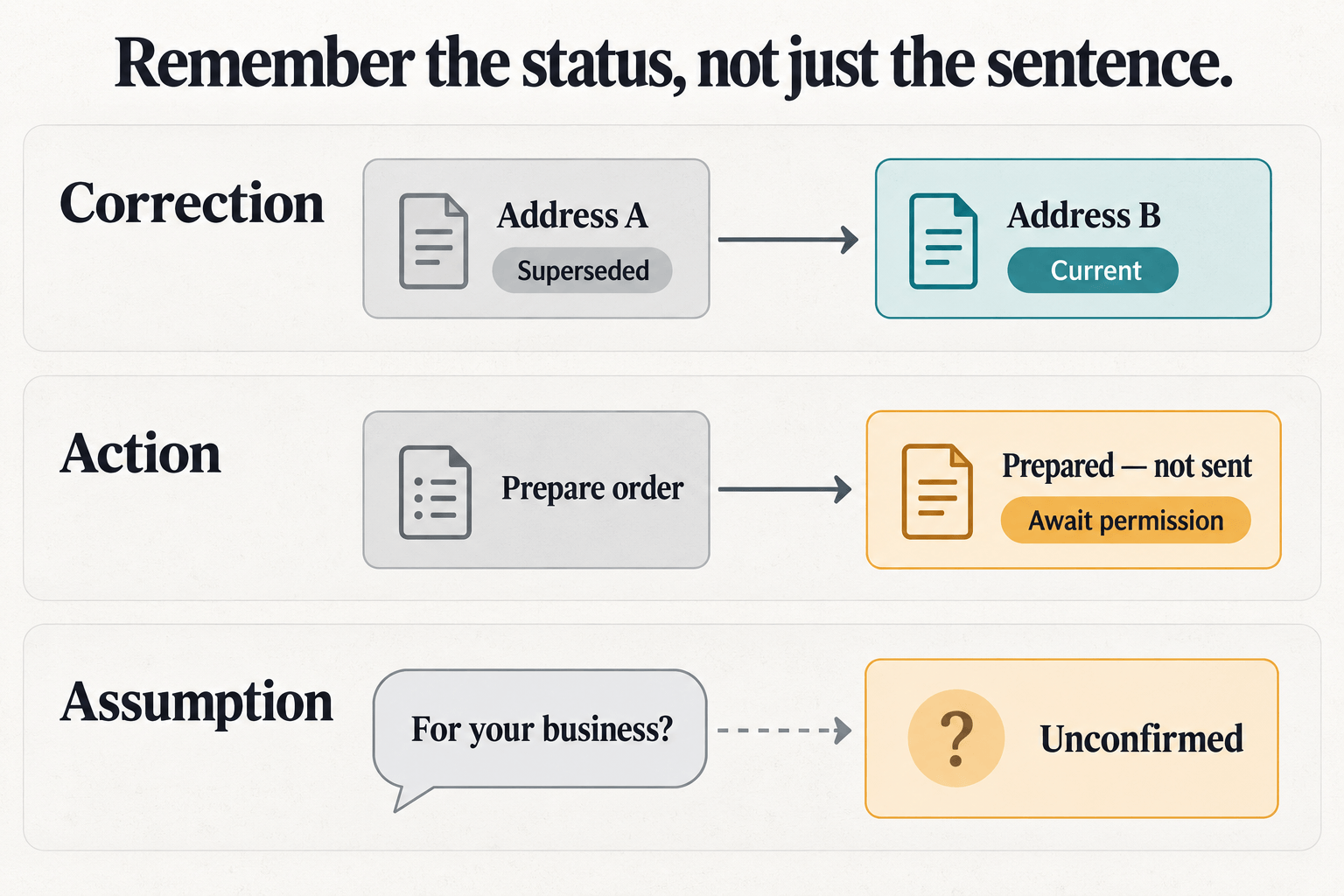
The interesting test is not whether a summary sounds good. It is whether a system can use the summary to answer a concrete question or choose a permitted next step. Remember the status, not just the sentence.
Six things memory has to preserve
These failure classes make useful test cases because they ask memory to preserve relationships and status, not just names or keywords.
| Failure class | Conversation change | What a later response should do |
|---|---|---|
| Corrected fact | “Use address A.” Later: “Actually, use B.” | Use B and treat A as superseded. |
| Negative instruction | “Prepare the order, but don’t send it yet.” | Preserve the restriction. Preparing the order is not permission to send it. |
| Unresolved task | A user requests a quote for 25 chairs, promises to supply the finish later, then says “Use walnut.” | Attach the new detail to the pending quote; don’t treat receiving it as completing the quote. |
| Fact versus assumption | The assistant guesses an order is for the user’s business; the user never confirms it. | Say the purpose is unknown, rather than repeating the guess as fact. |
| Changed preference | “Use option X.” Later: “I’ve changed my mind; use Y.” | Treat Y as the current preference. |
| Completed state | A trusted order-service receipt confirms an order was sent. | Recognize that sending is complete; don’t propose sending it again. |
That last case needs care. The record that an order was sent remains true. What changes is whether sending remains a pending action. A memory system can help a model reason about history; it cannot replace the application’s authoritative record of a transaction or its permission checks.
Three ways to carry the conversation forward
To test the memory representation separately from the conversation, compare three defined configurations.
Full history supplies every earlier message with the final probe. It gives the reader model access to the whole record, though that does not guarantee it will interpret every correction correctly.
A recent-message window supplies the last four complete user–assistant exchanges. Older exchanges are omitted. Four is a convenient experimental setting that makes the comparison concrete. Four exchanges is an experimental configuration, not a recommended production window. A real application should choose its own window for its tasks, model, and context budget.
A structured rolling summary keeps a cumulative summary of older exchanges and appends the last four complete exchanges. As each older exchange leaves the recent window, a summarizer folds it into the existing summary.
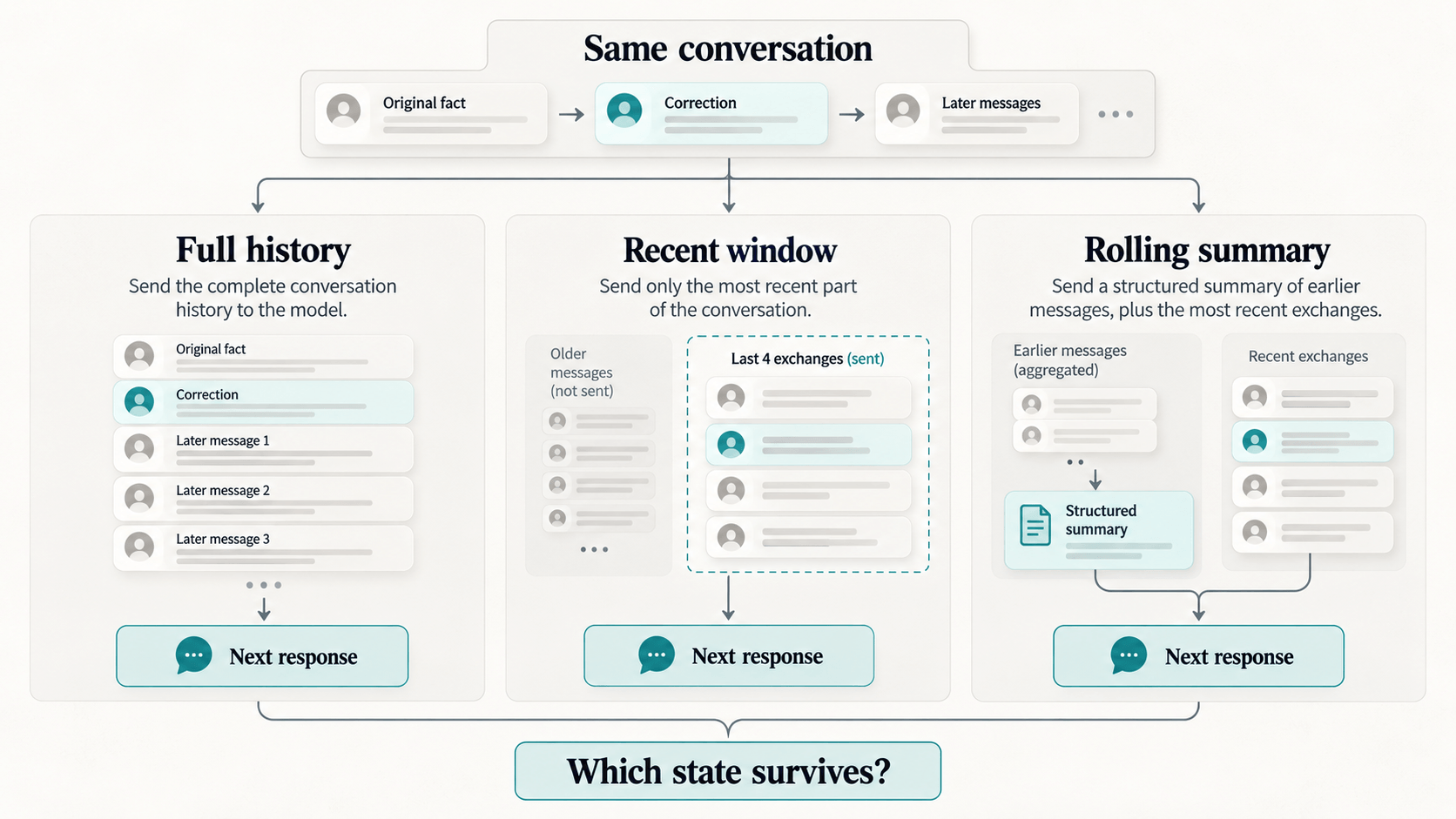
These describe three reference configurations, not every possible design. A recent window can have different sizes. A summary can use a database, retrieval, or hand-maintained state alongside prose. The comparison asks what these specific inputs preserve as important information moves earlier or later in a conversation.
What exactly does a rolling summary contain?
If the system’s job is to preserve actionable state, its summary should make state visible. Here is an illustrative state snapshot, focused on the address:
The six sections make it possible to ask specific questions. Which value is current? What did it replace? What instruction constrains the next action? What still needs an answer? What has already happened? Which details are guesses?
This is a reference design for the test protocol, not an observed model output or ModelRiver’s production schema. ModelRiver currently represents session summaries with summary, facts, actions, and open_items. The more detailed example here illustrates distinctions an application might choose to track; a schema by itself cannot guarantee they will be preserved accurately.
There is a practical reason to test this explicitly. Anthropic’s context-engineering guidance warns that aggressive compaction can discard subtle details whose importance only becomes clear later. It also describes structured notes as a way to track progress and dependencies across long tasks. Anthropic’s compaction documentation explains how summaries can replace older turns while recent turns remain available. These are useful implementation references, but neither establishes which strategy preserves the state in our six cases. That is the question the protocol below is designed to test.
A protocol you can run on your own chatbot
The accompanying fixture pack contains twelve synthetic conversations: two variants for each of the six failure classes. Each transcript has twelve prior user–assistant exchanges and a final probe. The expected state and acceptable next behavior are documented alongside the cases.
In each pair, the conversation content stays the same while the key update moves. In the early variant, the correction or instruction arrives before eight unrelated exchanges. In the late variant, it arrives after those exchanges. Two neutral exchanges follow, then the probe. This makes position a deliberate variable: the recent-window strategy should have different access to an early update than a late one. Whether the rolling summary preserves either update is something to inspect, not assume.
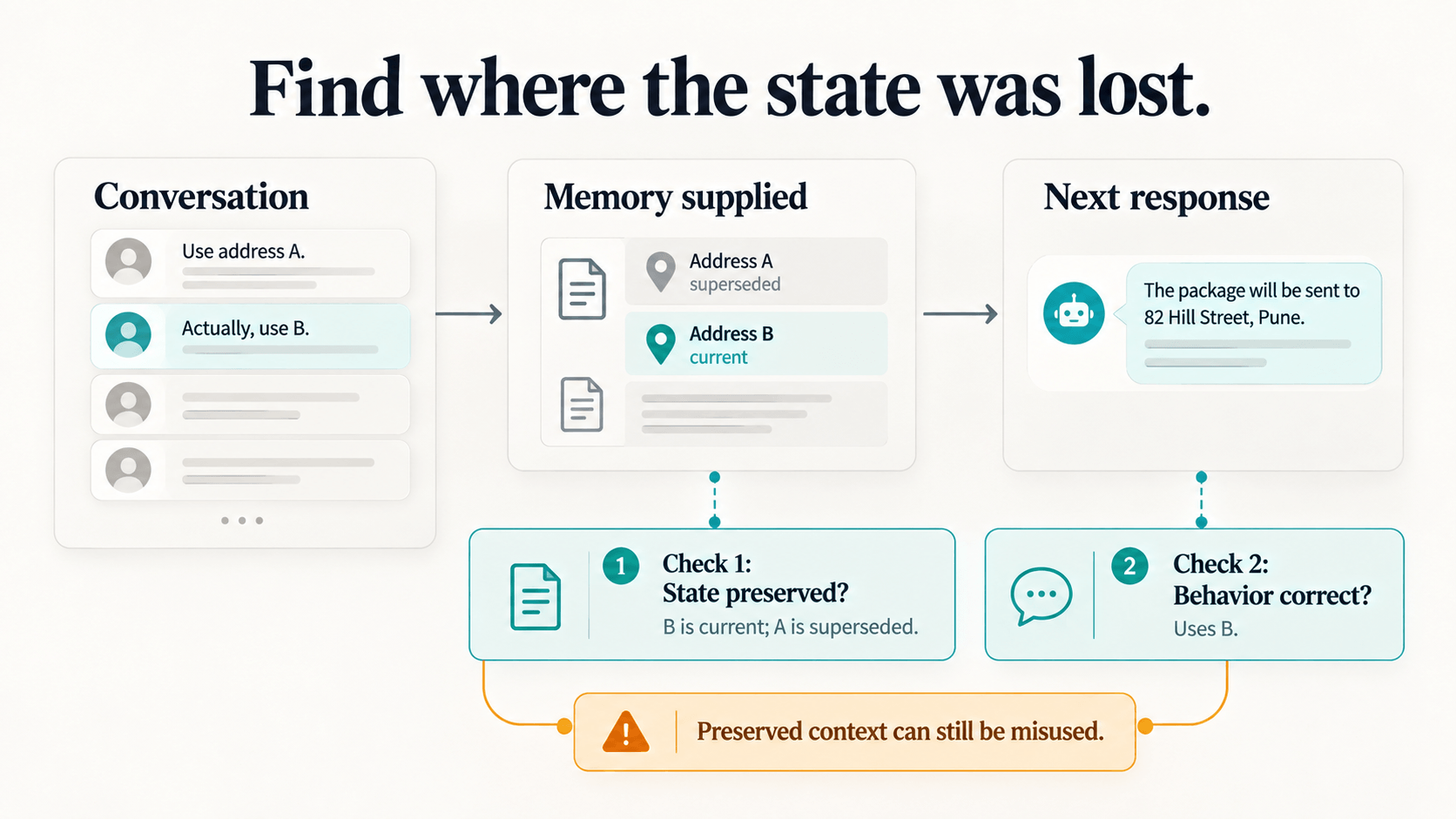
For each transcript, prepare the three memory inputs described above. Then inspect the exact memory supplied to the final probe and record two separate judgments:
- Was the needed state preserved? Does the input distinguish current facts from superseded ones, preserve the constraint, or mark the assumption as unconfirmed?
- Did the response behave correctly? Does it answer or propose an action consistent with that state?
Record the memory’s token count at the probe, response correctness, and—if you run live generations—model, settings, latency, token usage, and estimated cost. Keep the model and settings fixed across conditions. If you repeat the exercise, report the number of cases and outcomes; this small protocol is exploratory, not a formal benchmark.
The fixture pack includes a reference schema, a summary prompt, and the twelve conversation fixtures. It does not include an API runner or completed results. You can use it to inspect your own chatbot without downloading anything first: the address conversation above is a complete worked example. The downloadable address fixtures use the same correction with a fixed set of unrelated exchanges.
What survived, and what didn’t?
Without live runs, we cannot rank these strategies or report cost, latency, or success rates. If you run the protocol, start with a table like this. The dashes are unmeasured values, not zeroes.
| Strategy | Memory tokens at the probe | State preserved | Correct response |
|---|---|---|---|
| Full history | — | — / evaluated runs | — / evaluated runs |
| Recent four exchanges | — | — / evaluated runs | — / evaluated runs |
| Rolling summary + recent four | — | — / evaluated runs | — / evaluated runs |
Break the outcomes down by failure class and early versus late placement. Report partial preservation separately, and include two or three failures with the exact supplied memory and response. Keep the final-probe cost and latency separate from the work of maintaining the rolling summary; a shorter final input can still require additional summarization calls.
You can begin without provider credits: inspect the fixed full-history and recent-window inputs against each case’s expected state. A hand-written summary can help you define the target representation, but it does not test a model’s summarization quality. Response correctness and a model-generated rolling summary remain unmeasured until you run them.
How to tell where memory failed
Imagine three outcomes from the negative-instruction case. These are hypothetical examples to show how to read a failure, not outputs we observed.
The instruction was lost. The summary says “Order 1042 is ready” and omits “do not send until approval.” The response proposes sending it. Inspect the summarization step: the later request cannot follow a constraint it never received.
The instruction survived, but the response ignored it. The supplied memory clearly says do_not_send_yet, yet the model recommends sending. The memory carries the state; the reader’s response does not respect it. That points to a different part of the system than a summary that dropped the instruction.
The answer is right by chance. The summary omitted the hold, but the model happens to say “I’ll wait.” The final answer looks safe, but the memory did not preserve the information that would make this behavior dependable on the next example.
Score preservation and behavior separately. A good final response does not prove that memory was good; a preserved memory does not prove the model will follow it. Inspecting both helps locate which part of an application needs attention.
Inspect the memory before blaming the answer
We build ModelRiver, so this question matters to our implementation too. Its session view exposes the current rolling summary, and each turn’s Memory snapshot shows the recorded memory text when available. That gives us something concrete to inspect when an answer uses an outdated fact. It doesn’t establish that the summary preserved the right state.
If you want to see how session memory is sent and returned, start with the session-memory API documentation or the session-memory chatbot template. For memory to be assembled, the project needs request-body logging enabled. ModelRiver’s Test Mode returns configured sample data; it cannot tell you whether a live model remembers or follows a correction. That requires live provider calls in your own evaluation.
One practical detail: ModelRiver begins with raw history and folds it into a rolling summary when its history limits are reached. Its trigger and schema differ from this article’s four-exchange reference configuration, so running a session in ModelRiver is not automatically a reproduction of this protocol.
Try it on your own chatbot
Pick a conversation with a correction. At the final question, inspect the context your application actually sends. Does it preserve which value is current? Then check whether the response uses that value.
If you want more cases, the twelve-conversation protocol includes negative instructions, unfinished work, assumptions, changed preferences, and completed actions. The method is deliberately small enough to adapt: the useful part is seeing whether your system kept the state the next decision depended on.
For related failure modes, see what happens when a fallback model changes product behavior and what broke when we sent one JSON schema to five providers.