
The bill that did not come from one expensive request
The first time I watched an AI bill climb in a way that felt unfair, I went looking for a villain request.
You know the kind. The one prompt that accidentally asked for a novel. The retry loop that never stopped. The developer who pointed staging at production keys. Those stories are real, and they make for clean postmortems.
What I found instead was quieter and worse: a few thousand ordinary requests that all looked fine in isolation. A primary model that was healthy. A backup that kicked in during a short outage. A cache miss rate that drifted up after a prompt change. A second workflow in the same project that nobody was watching because "it only runs for support tickets."
Nothing was broken. The spend still hurt.
That is the uncomfortable pattern in production AI. Costs rarely explode because of one catastrophic call. They grow through repeated traffic, retries, fallbacks, longer prompts, larger outputs, and usage you did not model when you set a single monthly number in a provider dashboard.
If your app talks to one provider through one model, a single budget might be enough. The moment you add failover, multiple models, or multiple features sharing one account, that number stops describing the system you actually run.
Why provider dashboards feel precise and still miss the point
Provider dashboards are typically good at one job: telling you how much you spent with that provider.
They are weaker at answering the questions teams actually ask once an AI feature leaves the prototype stage:
- Which product feature burned the money?
- Did spend come from the primary model or from fallback traffic during an incident?
- Did retries double-count cost, or did only the successful attempt land on the bill?
- Is the support workflow fine while the chat workflow is about to blow past the monthly plan?
- If Model A is over budget, should Model B still answer, or should the whole request die?
Those are application questions. Provider billing is account-shaped. Your architecture is feature-shaped, workflow-shaped, and often multi-provider-shaped.
So teams invent their own controls: spreadsheet alerts, cron jobs that scrape invoices, hard-coded circuit breakers, "please don't use GPT-4o after 4pm" Slack messages. Some of that works. Most of it arrives after the first surprise invoice.
The deeper issue is conceptual. A budget is a control surface. If the control surface does not match how requests move through your system, the budget will either be too coarse to protect you or too blunt to keep the product online.
Multi-model workflows make one number feel dishonest
Imagine a support-ticket classifier. Primary model is a strong, expensive one. Backup 1 is a cheaper alternative from another provider. Backup 2 is a last-resort model you keep for outages.
On a quiet day, almost every request hits the primary. On a noisy day — rate limits, regional blips, a provider incident — traffic spills into backups. Your "monthly AI budget" is still one number. The shape of spend is completely different.
Now add the usual production reality: retries after timeouts, ModelRiver cache hits that should cost nothing, a playground hitting the same production workflow, a second workflow sharing the same project, or a backend pipeline that fans one user action into multiple model calls.
A single ceiling cannot express the policy you probably want: keep the product alive if the expensive model is too hot, but never let the whole project run away.
Two layers of AI cost control
After living with this problem, the mental model that finally stuck for me was layers.
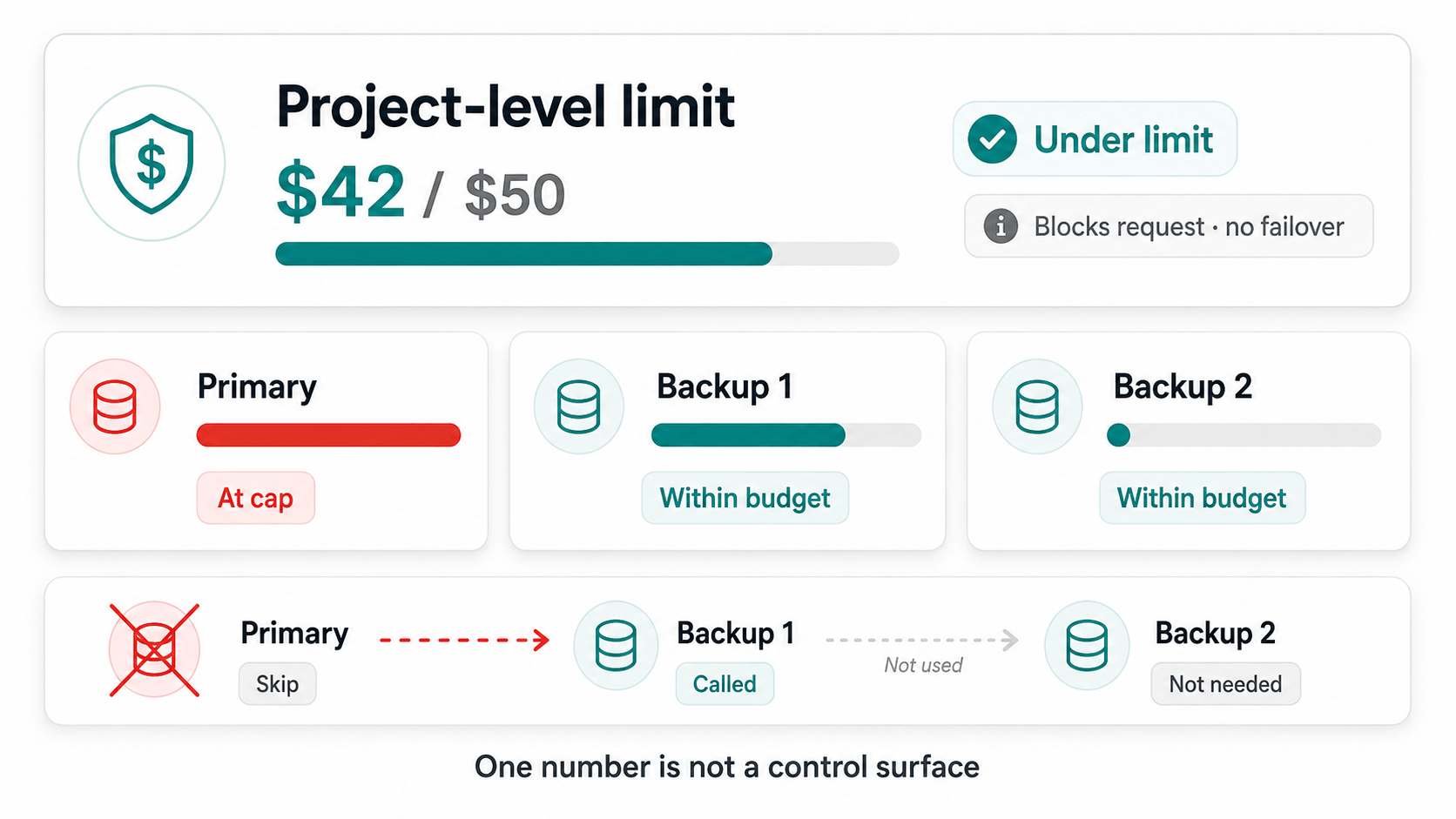
Project-level limit. A project-wide backstop across eligible spending in the project. This is the "do not ruin the company card" number. Once observed spend reaches the limit, new live requests are blocked without attempting failover. If the project is out of budget, the request is out of luck.
Model-level guardrail. A cap attached to the primary or an individual backup model in a workflow. This is the "this model can spend this much in this period" number. When a slot is over budget, skip it and try the next configured backup. The workflow can still succeed. The expensive model just stops receiving traffic until the period resets.
What this is not: a single total for "the whole workflow, no matter which model answered." In a failover design, that total is ambiguous. Did you want to stop the feature, or stop one model? Those are different policies. Treating them as the same policy is how you accidentally take the product offline during the exact incident you built backups for.
| Limit | When hit | Behavior |
|---|---|---|
| Project spending limit | Project spend for the period is at or above the cap | Block the request. Do not attempt failover. |
| Model cost guardrail | That workflow's provider/model slot is at or above its cap | Skip the slot. Try the next backup. |
| Every tried model over budget | Failover chain exhausted for budget reasons | Request fails with a budget error. |
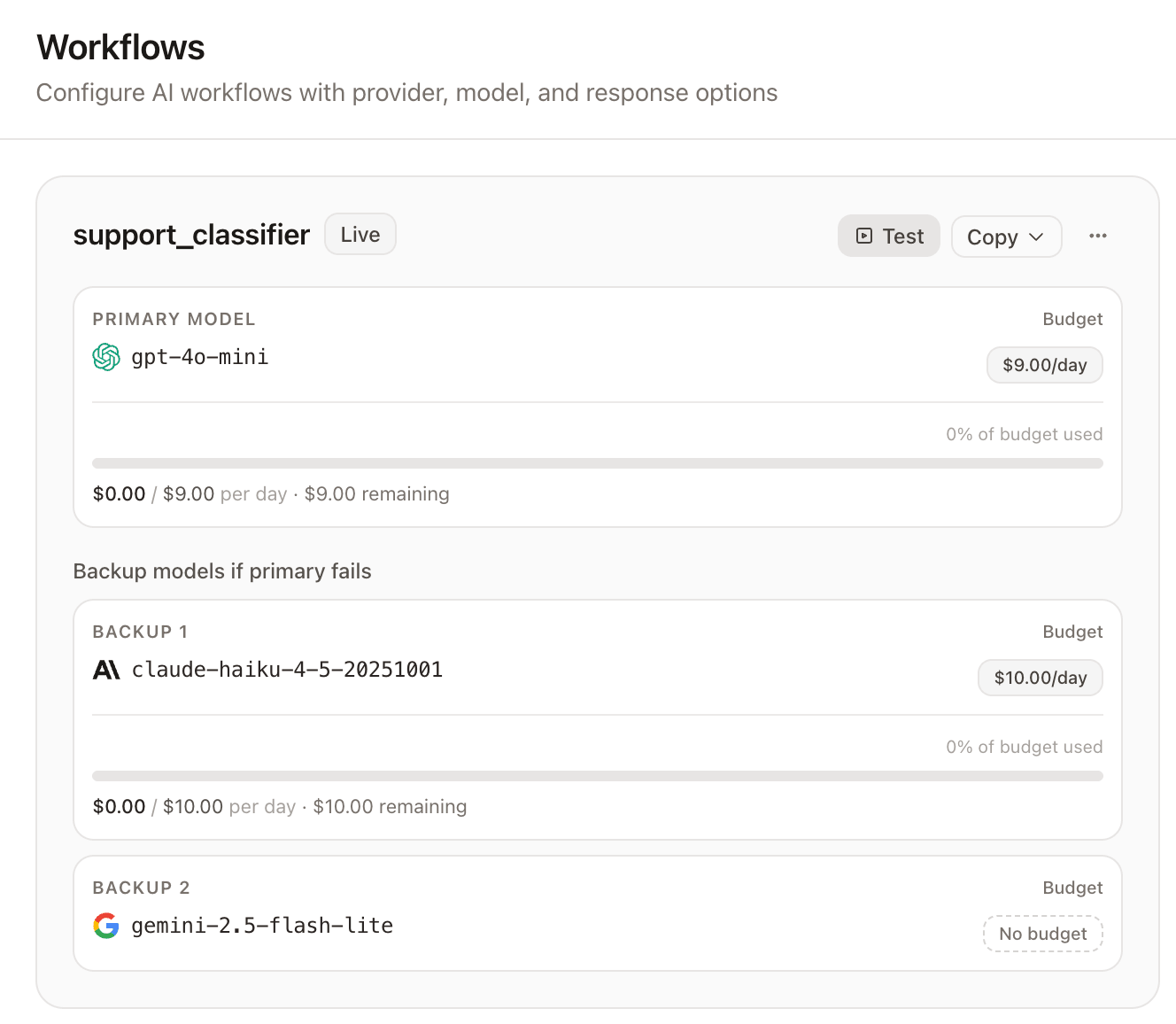
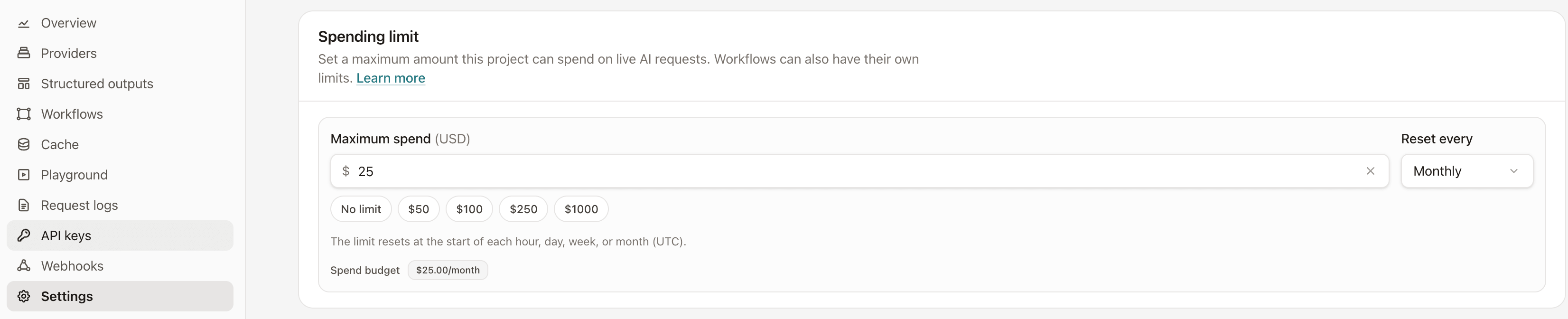
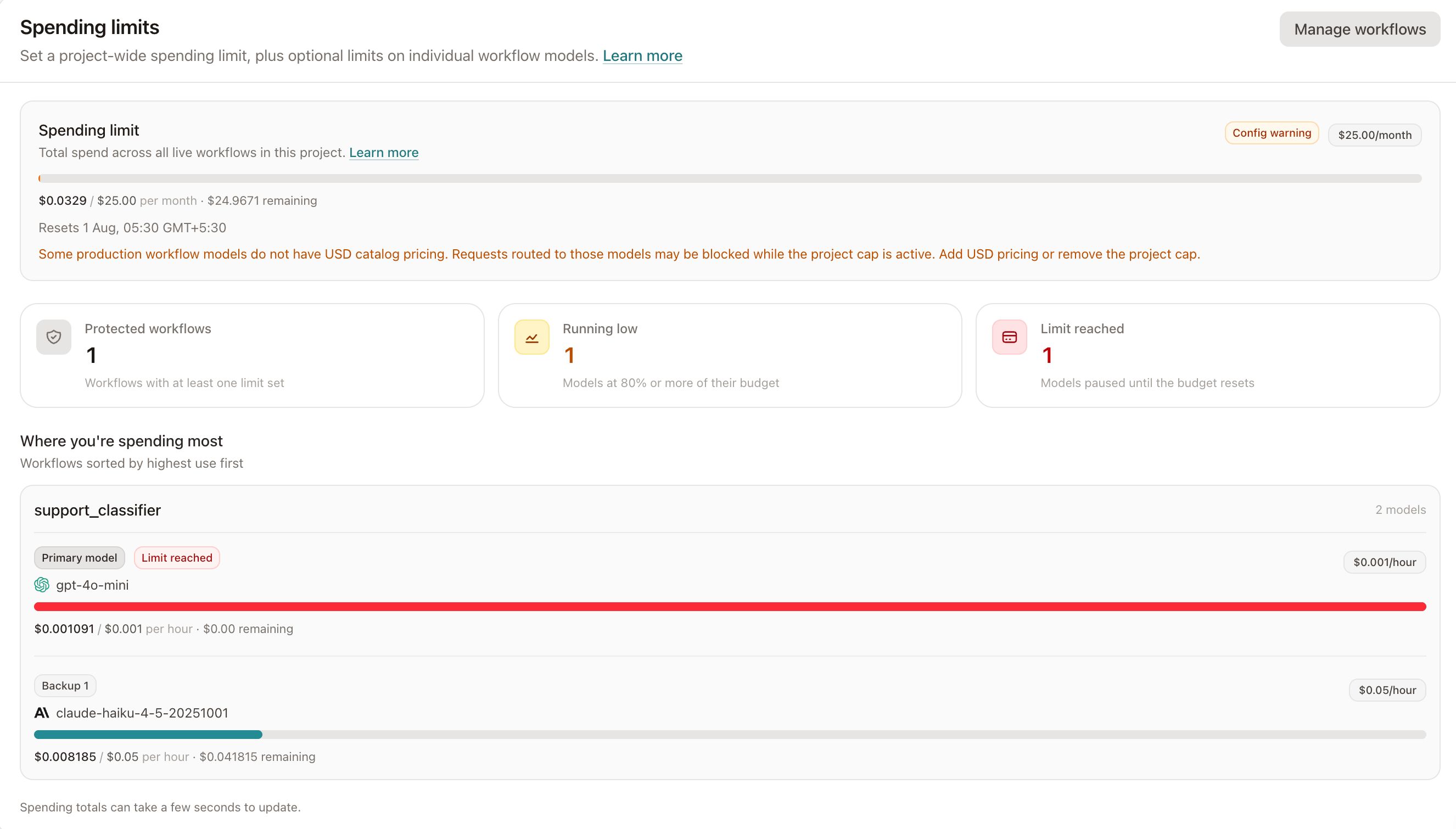
In a real console, the two layers show up as different controls. Model-level caps live on the workflow editor as a Cost guardrail under each primary or backup model, while the project-level limit lives under project Settings as a Spending limit.
What should count as spend (and what should not)
Before you trust any cap, you have to define the meter. A practical rule that maps cleanly to request logs:
Count successful, priced requests.
That means:
- A successful provider call with a real estimated price counts.
- A failed provider attempt is excluded from the guardrail calculation because the meter counts successful, positively priced request logs. Actual provider billing may differ in some failure scenarios.
- A budget skip does not count. Nothing was sent to the provider.
- A ModelRiver cache hit (prompt or response cache) priced at zero does not count, and it should not even need a budget check. That is different from provider-side prompt caching, which is not necessarily free.
- Child skip/error rows created during failover should not inflate the total just because the request was noisy.
Project totals get one more nuance if you run backend pipelines: linked AI steps that belong to another workflow still spend real money for the project. If the parent request fans out into child AI work, the project limit should see that spend too. Slot guardrails for that child work belong to the linked workflow, not the parent pipeline.
This is also where catalog pricing matters. If your gateway estimates cost from a model price catalog in USD, the budget is only as trustworthy as that catalog. Unknown pricing is not a small detail. For a capped model slot, the honest behavior is to skip the model rather than pretend you can enforce a dollar cap without prices. For a project limit, unknown pricing on a routable model is a configuration error that should block the request — not something to quietly ignore.
Periods are policy, not decoration
Hourly, daily, weekly, and monthly caps encode different fear levels:
- Hourly is for bleeding — useful while tuning a new feature or chasing a runaway loop.
- Daily is the practical default while you are still learning traffic shape.
- Weekly fits product cycles and on-call rotations.
- Monthly matches finance conversations and invoice panic.
All of them need a shared clock. UTC calendar boundaries are boring and correct: top of the hour, midnight UTC, Monday 00:00 UTC for weekly, and the first day of the month. Whatever period you choose, surface reset_at in the UI and in error payloads. A budget without a visible reset time is just a brick wall with no clock on it.
What happens mid-failover when a model is over budget
This is the moment that makes layered budgets worth the complexity.
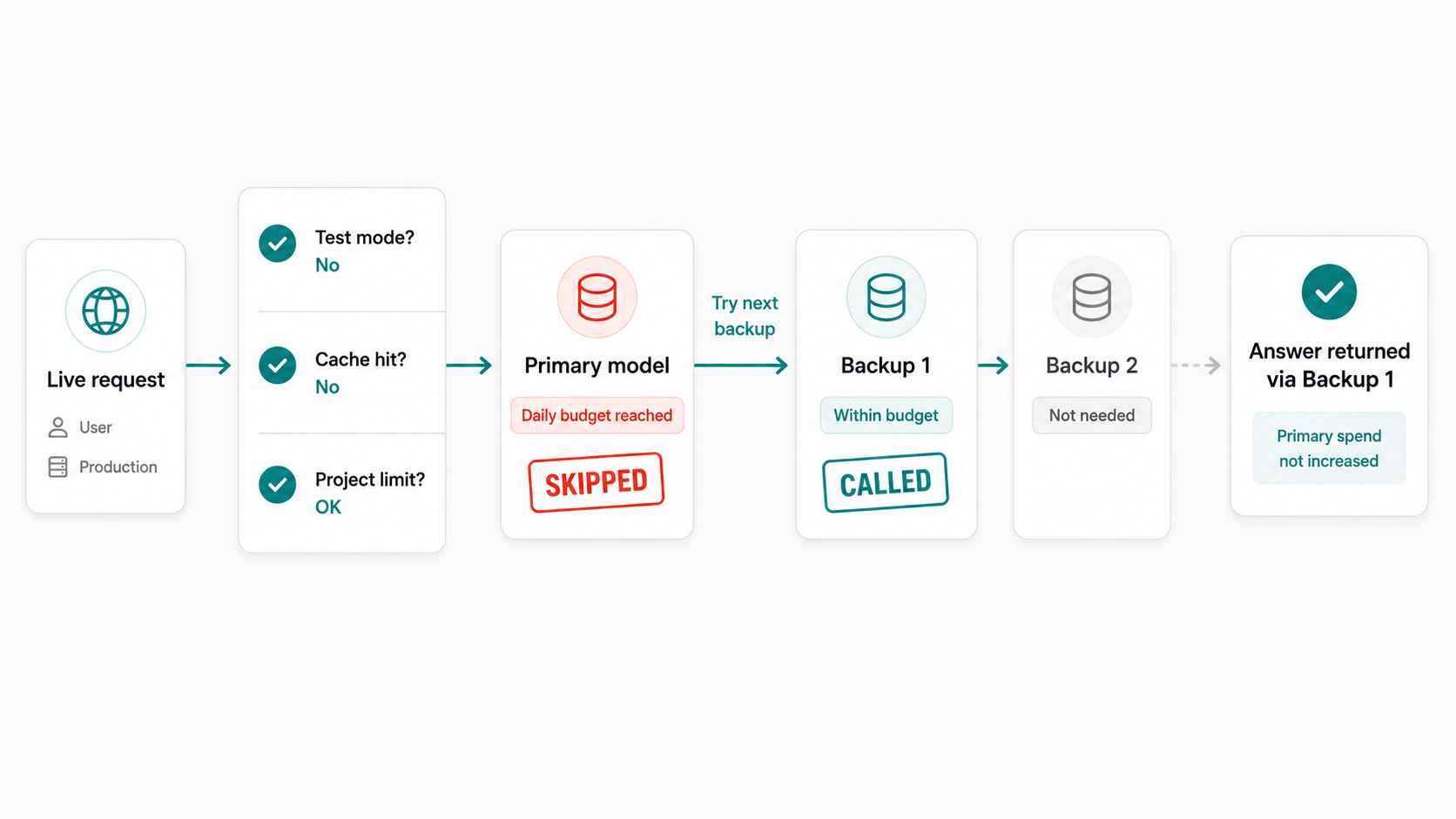
Request comes in. Project is still under its limit. Primary model has already hit its daily guardrail.
The right behavior is not "fail the user." The right behavior is:
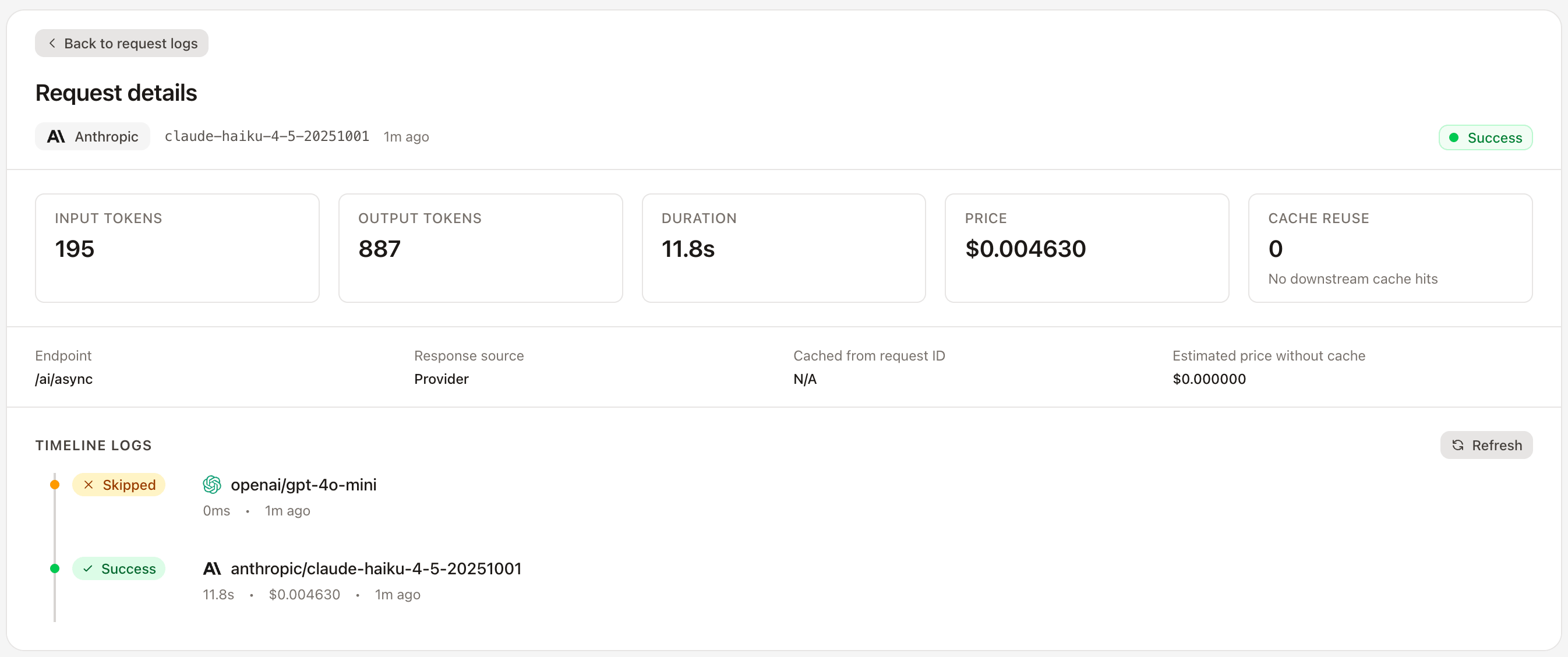
- Record that the primary was skipped for budget.
- Move to backup 1.
- Check backup 1's own guardrail.
- Call the provider only if that slot is still within budget.
If backup 1 is also exhausted and backup 2 still has room, keep going. If every available model has been skipped for budget, then fail with a clear budget error — not a generic 500, not a provider timeout costume party.
In request logs, this should look reconstructable after the fact. ModelRiver writes a budget-skip row before trying the next backup, so those skipped rows remain visible even when a backup succeeds. If the request ultimately fails, the skips are linked to a parent error. Operators should be able to answer "did we spend money, or did we refuse to spend money?" without spelunking.
Overlapping limits: the scenarios that actually happen
A few cases that come up constantly once both layers are active:
- Primary over daily cap, backups still open. The workflow stays alive; traffic shifts to the next model that still has budget.
- Workflow looks fine, project is done. Every model slot can still show remaining room, but the project limit blocks the request with no failover. The backstop wins first.
- One workflow capped, another uncapped. Valid design. The project limit still sums successful priced spend across both. Uncapped means unprotected at the slot layer, not invisible.
- ModelRiver cache hit for a prompt you already paid for. Zero price, no budget check. One of the few times the system gets to feel generous.
- Failed primary, successful backup. The failed attempt is excluded from the guardrail meter. The successful backup counts against that backup's slot and the project total.
- Every model in the chain is over budget. The request fails with a workflow budget error. No provider call.
One more case people trip over: test mode. If a workflow mocks or bypasses live provider spend, budget enforcement should stay out of the way. Production workflows in a live playground are different: if they can spend real money, they should respect real caps.
Soft enforcement is an honest trade-off
Here is the part marketing copy likes to skip.
If you check budgets on every request by summing logs from the database with no caching, you add latency to the hot path. If you cache spend for about ten seconds, concurrent requests can slip through before the cache refreshes. Under bursty traffic, spent can land slightly above the configured cap.
That is soft enforcement. It is not the same as "guaranteed hard stop at the exact cent."
For most product teams, soft enforcement is the right trade. You wanted a guardrail, not a distributed lock competing with every inference call. What you should demand instead is honesty:
- Say the enforcement is soft.
- Invalidate spend caches after successful priced logs.
- Show actual spent in the UI, even if it briefly overshoots.
- Block based on already-observed spend, not a forecast of the current request's future token count.
The last point matters. Estimating the cost of the request you have not made yet is a different, harder problem. Caps that only look backward are simpler and still catch the failure mode that hurts: sustained overspend.
Observability is half the feature
A spending limit you cannot see is just a mysterious outage generator.
At minimum, operators need project spent vs cap and reset time, per-model slot meters, a clear near-cap or at-cap signal, request logs that distinguish budget skips from provider failures, and error types such as project_budget_exceeded or workflow_budget_exceeded instead of "something went wrong." Missing catalog pricing needs its own config errors too — different diagnosis, different fix.
Without that, on-call will treat a budget block like a provider incident. With it, they treat it like what it is: policy working.
You might also like: Test AI workflows without burning tokens
Practical guidance if you are designing AI cost controls
Whether you build this yourself or use a gateway that already has it, the design lessons transfer.
- Separate "stop the model" from "stop the project." Different failure modes need different behavior.
- Put failover-friendly caps on model slots. Otherwise your reliability feature becomes a cost amplifier during incidents.
- Add a project backstop. Slot caps alone will not save you from five uncapped workflows discovering each other at 2am.
- Define the meter in terms of successful priced logs. Count money, not vibes.
- Use short periods while learning, longer periods once traffic is stable.
- Treat unknown pricing as a config error. A dollar cap without prices is theater.
- Log skips as first-class events. Future you will need to explain why the primary never ran.
- Do not confuse spend caps with rate limits or content guardrails. Different tools, different alarms.
How we ended up implementing this
We built ModelRiver as an AI routing gateway: projects, workflows, primary and backup models, request logs, caching — the unglamorous machinery you need once "call the provider SDK directly" stops being cute. Once failover existed, a single budget number felt wrong in our own product. So we added layered spend controls.
In the console they show up as a project Spending limit and per-slot Cost guardrail on primary, backup 1, and backup 2 — the same controls shown earlier. Live requests are checked in order: skip limits for test-mode workflows, skip limits on zero-price ModelRiver cache hits, enforce the project-level limit by blocking without failover, then enforce model-level guardrails with failover. Overview shows utilization. Request logs record budget skips with budget_guardrail as the response source. Soft enforcement is intentional and documented.
If you want the operator manual, it lives in the spending limits docs. The product page is AI spending limits.
What this does not promise
A few boundaries, said plainly:
- It does not guarantee zero overshoot under concurrency.
- It does not read your provider's final invoice line-by-line. It uses estimated catalog prices in USD.
- It does not replace finance alerts, procurement approvals, or adult supervision of API keys.
- It does not decide your product policy for you.
Those are not footnotes. They are the difference between a guardrail and a fantasy.
The shift that actually helps
The useful change is not "add a bigger budget field." It is treating a budget as policy: where spend is allowed to move when models fail, traffic spikes, or one feature starts eating every other feature's lunch.
Better questions than "how do we never overspend again":
- If the primary is hot, should users still get an answer?
- If the project is exhausted, should any workflow keep spending?
- Which successful calls count, and which noisy failures should not?
- When the wall hits, will tomorrow's on-call understand why?
Those questions are design work. The controls are just how you encode the answers.
If you want to see this shape in a running console, ModelRiver has a free tier where you can set a project spending limit, add per-model cost guardrails, and watch the failover behavior in request logs. The interesting part is not the form fields. It is watching a primary get skipped for budget and a backup quietly keep the feature alive.