
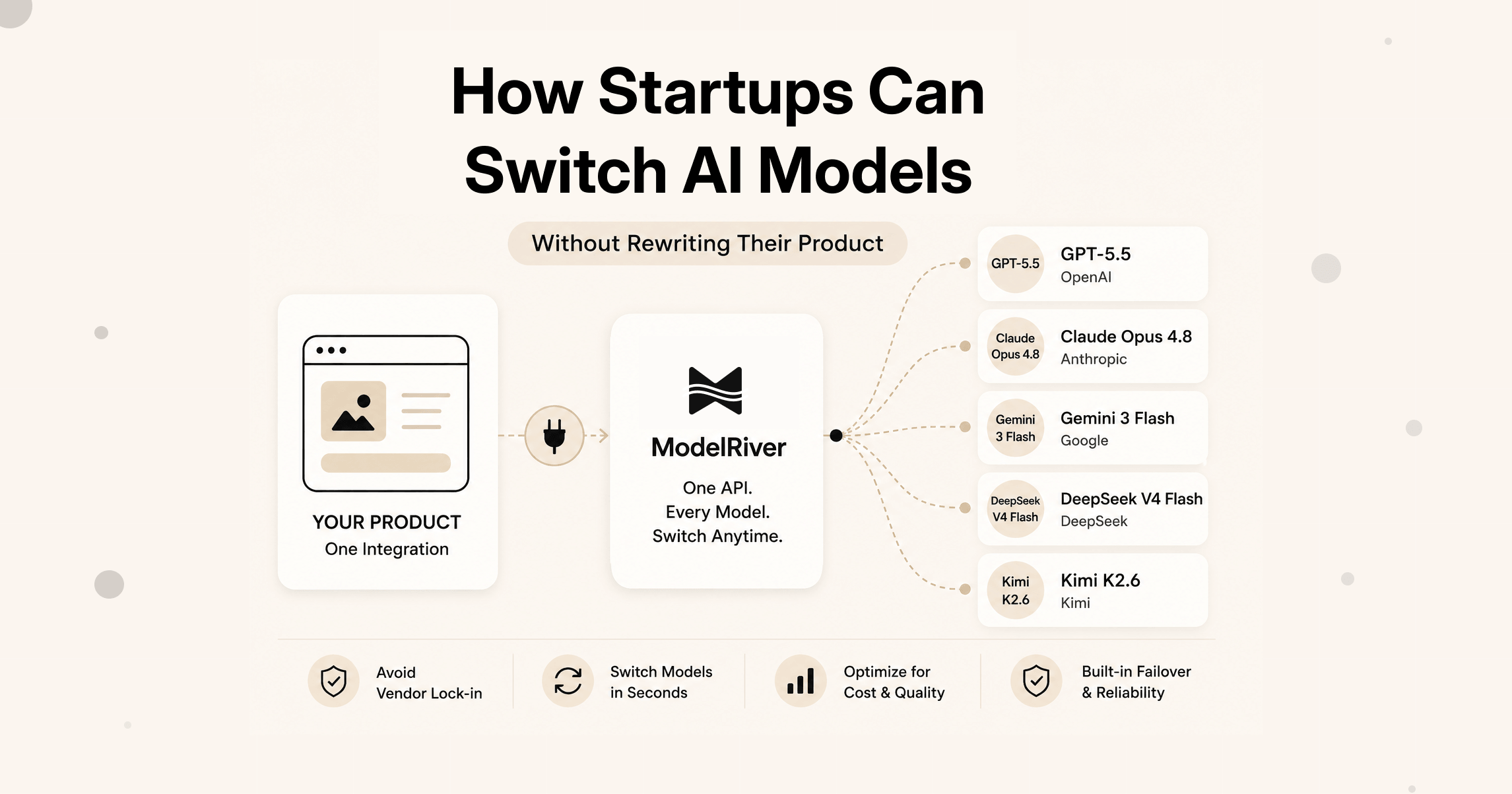
You picked GPT-5.5 when you launched. It worked. You shipped.
Then a few months later, a newer model comes out. Or a cheaper one. Or a faster one that your customers would notice. And someone on the team says: "Can we switch?"
That question is harder to answer than it should be.
Not because switching models is technically impossible. But because over time, the model you chose gets baked into everything. It is in your code. It is in your prompts. It is in your cost calculations. It is in the assumptions your team made when building the product.
Switching feels risky. So most startups stay on the model they started with, even when a better option is right there.
This post is about how to stop that from happening.
The hidden cost of AI provider lock-in
Most startups begin with one AI provider. Usually, that is a reasonable decision.
You are trying to launch a product, not build an AI procurement system. You pick GPT-5.5, ship the feature, and move on to the next problem.
The risk appears later. As the product grows, that first provider choice starts affecting cost, reliability, product velocity, and vendor risk. Better OpenAI alternatives appear. Your team wants to compare Claude vs GPT, Gemini vs GPT, or try DeepSeek V4 Flash and Kimi K2.6 for specific workflows. But engineering work becomes the blocker.
This is also called AI vendor lock-in. It is not just a legal or procurement problem. For startups, it usually shows up as slow product decisions.
Here is the pattern many SaaS teams run into:
At that point, the problem is no longer just technical. Product experiments slow down. AI cost optimization gets harder. A single provider outage becomes a business risk. Your team may know that multiple AI providers would help, but the work to switch AI models keeps getting pushed back.
That is AI provider lock-in.
Why AI provider lock-in happens in startups
When you first add AI to a product, you pick a model and move fast. That is the right call. You do not want to spend weeks evaluating models when you are just trying to ship.
But that speed creates a problem later.
Here is what typically happens:
You hardcode gpt-5.5 in your API calls. Your prompts are written specifically for how GPT-5.5 responds. Your response parsing assumes a certain output format. Your cost estimates assume OpenAI pricing. Your team logs say "called GPT-5.5" but nothing more.
Now a new model launches. Anthropic releases Claude Opus 4.8. Google ships a stronger Gemini model. DeepSeek V4 Flash gets good enough for high-volume tasks. Kimi K2.6 becomes attractive for long-context work. Or you realise that for one specific feature, a smaller model does a better job at one-tenth the cost.
You want to try it. But to switch even one feature, your developer needs to:
- Find every place the model name is hardcoded
- Update the API call, the error handling, and possibly the SDK
- Adjust the prompt because the new model responds differently
- Re-test the whole feature from scratch
- Hope nothing breaks in production
That is a lot of work for what should be a simple experiment. And so the team decides it is not worth it. You stay on GPT-5.5. Another quarter passes.
This is how AI model switching becomes a business problem. Not because you planned it that way. Just because switching was never made easy.
What it really takes to switch AI models
Switching models is not just changing a string in your code. There are a few real things you have to handle:
The model name is in your app code. If you call gpt-5.5 directly in your API calls, every switch means a code change and a deployment. For a startup moving fast, that slows product velocity.
Different models respond differently. The same prompt can produce very different outputs depending on the model. You need to test the new model before it touches real users, or a cost-saving experiment can turn into a product quality problem.
Costs change with every switch. A cheaper model sounds great until you realise it uses twice as many tokens to say the same thing. You need actual numbers before you decide. This is where AI cost optimization becomes a product decision, not just an engineering task.
You need a safety net. What happens if the new model goes down? Or if it suddenly starts giving worse results? You need AI failover, or reliability becomes tied to one provider's uptime.
You might also like: Why Most AI Apps Need an AI Gateway Sooner Than They Think
Your existing tools need to keep working. If your team uses LangChain, LlamaIndex, or the Vercel AI SDK, you cannot afford to rewrite everything just to try a new provider.
None of these are unsolvable. But they all need to be handled, and most teams do not have a clean system for doing that. That slows experiments, increases vendor risk, and makes multi-model AI harder than it should be.
| Traditional AI Integration | Workflow-Based AI Integration |
|---|---|
| Model name in code | Model configured outside code |
| Deployment required to switch | No deployment required |
| Hard to compare providers | Easy to compare providers |
| Provider lock-in risk | Provider independent |
| Manual failover | Automatic failover |
| Difficult testing | Built-in Test Mode |
The better way to think about this
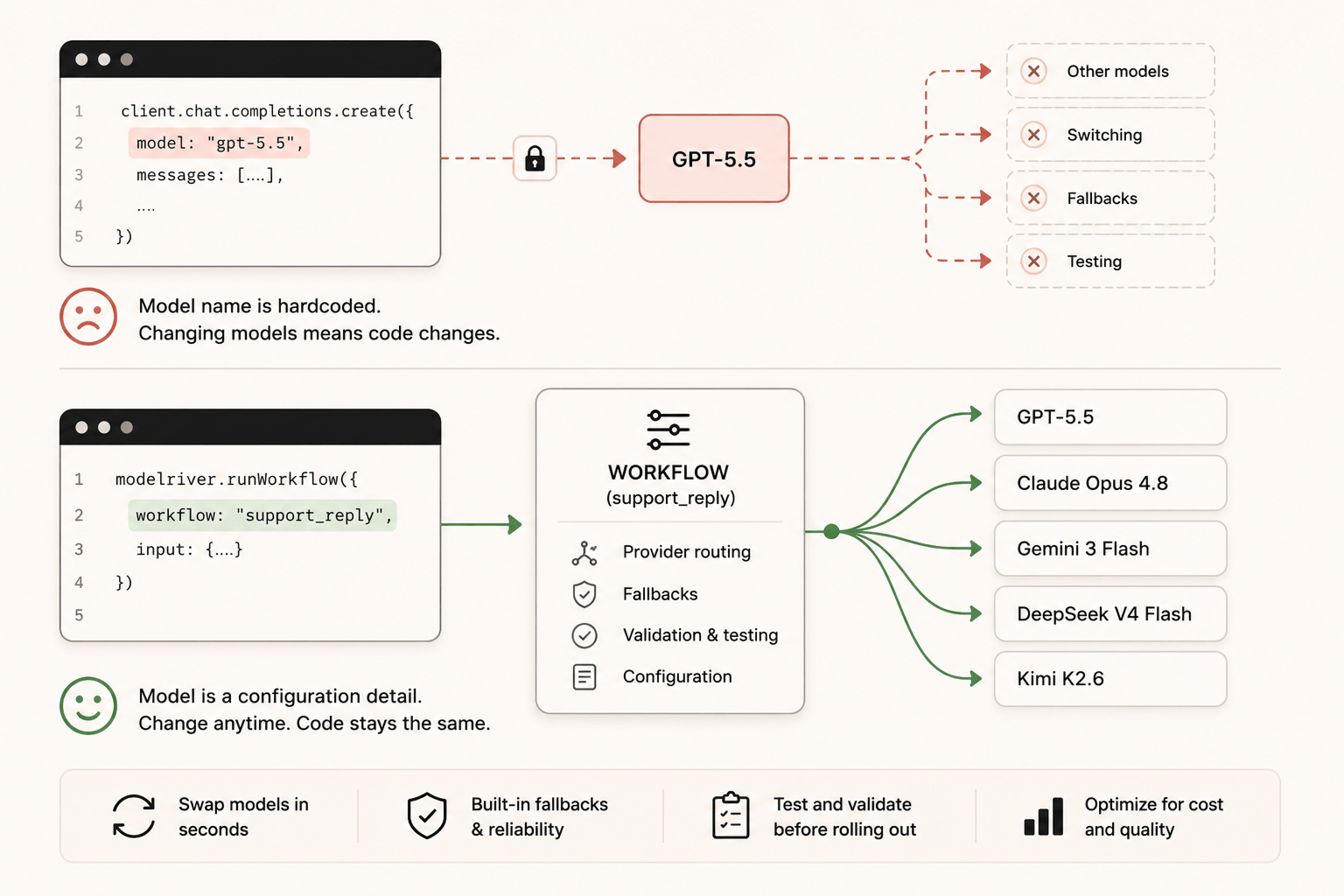
The core problem is that most products are built with the model name as a fixed part of the code. The fix is to separate the model from the product.
Instead of your product calling gpt-5.5 directly, it calls something like support_reply or meeting_summary or lead_scoring. That name is stable. It belongs to your product logic. The actual model behind it is a configuration detail that lives outside your code.
When you want to try a new model, you change the configuration. Your code does not change. Your prompts are still tested. Your product keeps working. And if the new model causes problems, you switch the configuration back.
This is what ModelRiver calls a workflow. Each AI feature in your product maps to an AI workflow. The workflow holds all the details: which provider to use, which model, what the fallback is if that model fails, and how to validate the response. Your product just sends a request to the workflow name.
That means the product team can ask better questions. Should support replies use GPT-5.5, Claude Opus 4.8, Gemini 3 Flash, DeepSeek V4 Flash, or Kimi K2.6? Which model is cheaper for this workflow? Which one is more reliable? The answer can come from tests and logs, not from a code rewrite.
How ModelRiver makes model switching simpler
You change the model from a dashboard, not in code
When you route your AI features through ModelRiver workflows, switching a model is a dashboard change. You go to the workflow for that feature, pick a different provider or model, save it. Done.
No code change. No deployment. No risk of breaking other features while you edit one file.
Your developer does not have to be involved every time your product team wants to test a new model. That is the biggest practical difference. Model switching becomes a product experiment instead of a sprint planning item.
You can compare costs before committing
One of the hardest parts of switching models is not knowing if it will actually save money. Cheaper per-token rates sound good on paper, but if a model uses more tokens to produce the same output, you might end up spending more.
ModelRiver tracks the cost of every single request, broken down by provider and model. You can look at what GPT-5.5 costs you per request for a specific feature, then try Claude Opus 4.8, Gemini 3.1 Pro Preview, DeepSeek V4 Flash, or Kimi K2.6 on that same feature and see the real numbers side by side.
That comparison happens inside the product, with your actual traffic, before you make any permanent decisions.
You can see things like:
Now you have something real to decide with. You are not guessing from provider pricing pages. You are comparing costs for your own AI workflow.
Your existing framework code keeps working
If your team already uses LangChain, LlamaIndex, Haystack, or the Vercel AI SDK, you do not have to change how you write AI code. ModelRiver is OpenAI-compatible, so you just change two things: the base URL and the API key. Everything else stays the same.
If you are using LangChain:
Same pattern for LlamaIndex, Haystack, and others. Two config values change. Nothing else does.
If you want to understand which framework fits your use case best before deciding how to connect it, our LLM frameworks comparison breaks that down in detail.
You get a fallback if the new model fails
Switching models is not a one-time decision. Models go down. Providers have outages. Rate limits get hit during peak hours.
With ModelRiver workflows, you set a fallback chain when you configure the workflow. If your primary model fails, the request automatically goes to the next one. Your users never see an error. You find out from your request logs, not from customer support tickets.
For example, a workflow might be set to try Gemini 3 Flash first, then fall back to Claude Opus 4.8, then fall back to GPT-5.5. Another high-volume workflow might start with DeepSeek V4 Flash or Kimi K2.6. You decide that priority based on cost and reliability data, not guesswork.
You can test a new model without touching production
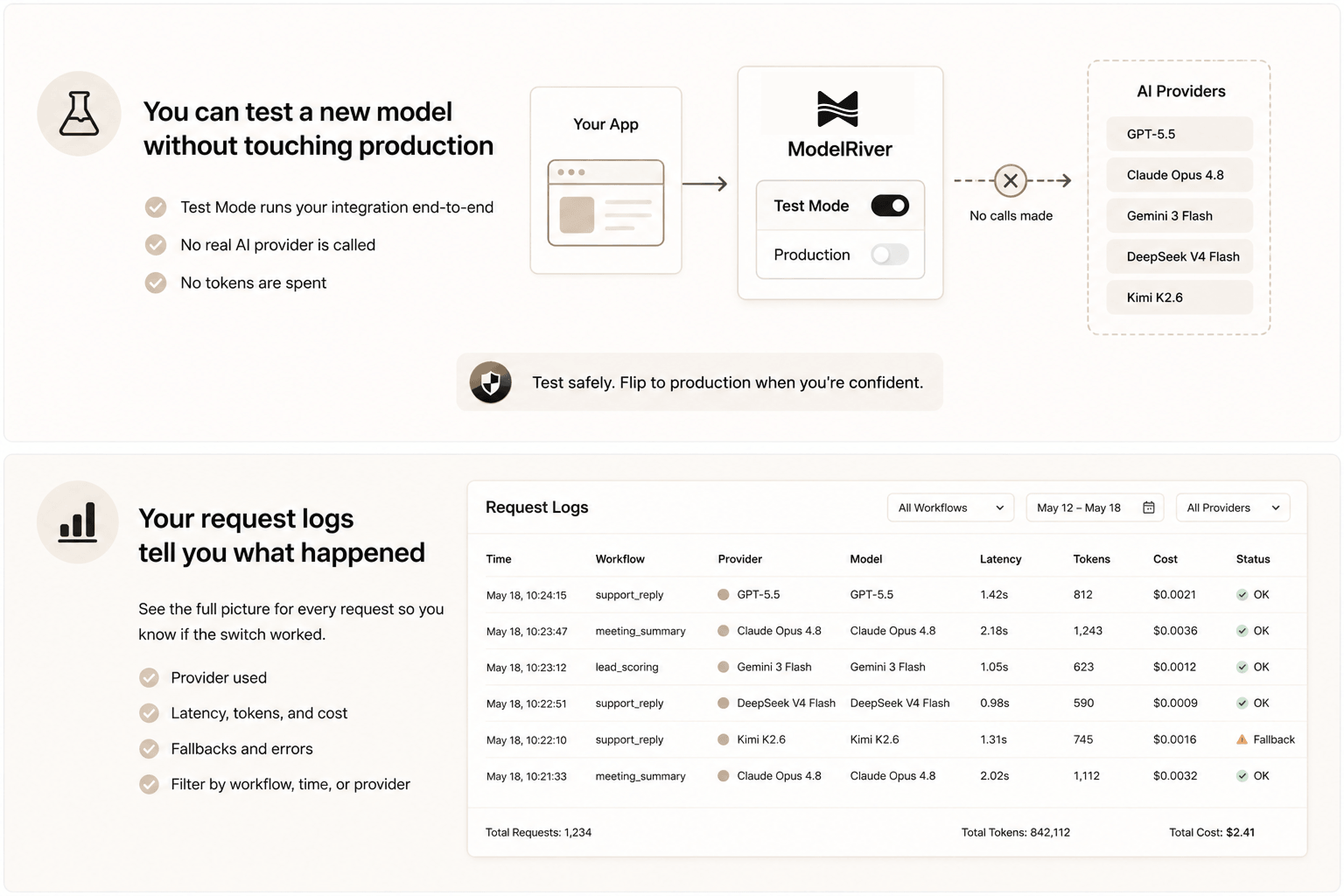
Before switching any feature to a new model in production, you can test it using Test Mode in ModelRiver. Set the workflow to testing, define what a good response looks like, and run your integration against it. Your existing code runs against the real API, with real auth and real logging, but no actual AI provider is called and no tokens are spent.
Once you are confident the integration works, you flip the workflow to production with the new model. That is the switch.
This removes the biggest fear around model switching: making a change that breaks something for real users before you have had a chance to catch it.
You might also like: Test AI Workflows Without Burning Tokens
Your request logs tell you what happened
After you switch a model, you need to know if it worked. Not just "did the feature run" but "was the quality good, was it faster, did anything fail?"
ModelRiver logs every request with a full timeline. You can see which provider served each request, how long it took, how many tokens were used, what the estimated cost was, and whether any fallback was triggered. You can filter by workflow, by time range, by provider.
If something goes wrong after a model switch, you are not guessing. You open the request log for that feature and see exactly what happened. That makes AI reliability measurable, which makes it easier to explain model decisions to the rest of the company.
A practical checklist for switching AI models
Here is what the process looks like when you use this approach:
-
Name your AI features as workflows. Each feature in your product gets a stable workflow name in ModelRiver.
support_reply,onboarding_email,deal_summary, whatever matches your product. -
Route your code through ModelRiver. Change your base URL and API key. Your existing code keeps working.
-
Look at your current costs. Open the request logs and see what each workflow costs you today, per request and in total.
-
Create a test workflow for the new model. Duplicate the existing workflow, point it at the new provider and model, and put it in Test Mode first.
-
Run your integration tests. Make sure the responses still look right and your product handles them properly.
-
Switch to production with the new model. Flip the workflow to production with the new model and set your current model as the fallback.
-
Watch the logs for a few days. Compare latency, cost, and failure rates. If the new model is better, keep it. If not, flip the fallback to primary and move on.
That whole process, from first test to confident switch, can happen in a day. Without any code deployments.
Why model flexibility is becoming a competitive advantage
The AI model landscape is moving fast. What was the best option six months ago might not be the best option today. New models come out constantly. Prices drop. Quality improves.
A startup that can try and switch models easily has a real advantage. You can cut costs when a cheaper model is good enough. You can upgrade quality when a better model ships. You can avoid a single provider outage taking down your whole product.
The startups that are stuck on one model are not stuck because there are no better options. They are stuck because switching was never made easy.
The fix is simple in principle: stop hardcoding the model name. Give your AI features stable names that live in configuration, not in code. Then the model behind each feature becomes something you can change, compare, and optimize whenever you want.
What happens when switching models becomes easy?
When switching models becomes easy, your team starts making better product decisions.
You can test a new OpenAI alternative without turning it into a migration project. You can compare Claude vs GPT for quality, Gemini vs GPT for speed, or DeepSeek V4 Flash for cost. You can use GPT-5.5 for the workflows where quality matters most, and a cheaper model for high-volume tasks where speed and cost matter more.
This changes the way a startup works:
- Faster experimentation: Product teams can try new models without waiting for a full engineering cycle.
- Lower AI costs: Teams can move expensive workflows to cheaper models when quality is good enough.
- Reduced vendor risk: One provider no longer controls the reliability of the whole product.
- Better reliability: AI failover lets requests continue when a provider has an outage.
- Faster adoption of new models: When Claude, Gemini, DeepSeek, Kimi, or OpenAI ships something better, you can test it quickly.
The startups that win with AI will not necessarily be the ones using the best model today. They will be the ones that can adopt the best model tomorrow.
Getting started
If this describes where you are right now, the migration is simpler than it probably sounds:
- Create a ModelRiver account (free, no credit card required)
- Add your provider keys (OpenAI, Anthropic, Google, Mistral, and others)
- Create your first workflow (pick a model, add a fallback, give it a name that matches your feature)
- Change your base URL and API key to point at ModelRiver
- Open the request logs and see your real costs per feature for the first time
From there, trying a new model is just changing a workflow setting. No code change required.
FAQ
What is AI provider lock-in?
AI provider lock-in happens when your product becomes too dependent on one AI provider. The model name, prompts, error handling, response parsing, and cost assumptions are all tied to that provider. Switching later is still possible, but it takes engineering work that slows the business down.
Can I switch from OpenAI to Claude without rewriting my application?
Yes. With a workflow-based setup, your application calls a stable workflow name like support_reply. The workflow decides whether that request goes to GPT-5.5, Claude Opus 4.8, Gemini, DeepSeek, or another model. To switch from OpenAI to Claude, you update the workflow configuration instead of rewriting the application.
What is the best way to manage multiple AI providers?
The best approach is to keep provider choices outside your product code. Use an AI workflow for each product feature, then configure the provider, model, fallback, testing mode, and cost tracking at the workflow level. That gives you multiple AI providers without scattering provider logic across your app.
Do I need to rewrite my code to use ModelRiver?
No. ModelRiver uses the same OpenAI-compatible API format. You change two configuration values (base URL and API key) and your existing code keeps working. LangChain, LlamaIndex, Vercel AI SDK, and any OpenAI-compatible SDK work without modification.
Can I switch models for just one feature without affecting others?
Yes. Each feature has its own workflow in ModelRiver. Changing the model for one workflow only affects that feature. Everything else stays exactly as it is.
How do I know if a new model is cheaper?
ModelRiver tracks the cost of every request by provider and model. You can compare costs for the same workflow across different models before making any permanent decision.
What happens if the new model goes down?
You set a fallback chain when you configure the workflow. If the primary model fails, the request automatically routes to the fallback provider. Your users get a response. You see the failed attempt in your request logs.
Can I test a new model before switching?
Yes. ModelRiver's Test Mode lets you validate your integration without making real provider calls or spending tokens. You can confirm everything works before switching production traffic to the new model.
Questions about your specific setup? We are @modelriverai on X.