

The meeting every CTO has had this year
Someone in leadership asks, "When are we adding AI?"
You already know the honest answer is complicated. Your product has paying customers. Your codebase is eight years old. Your support queue, billing logic, and database schema all carry years of decisions that nobody wants to touch on a Friday afternoon.
You have seen the demos. You have also seen what happens when a model confidently invents an order number.
So the conversation usually collapses into two bad options:
- The big bang. Ship an AI feature to everyone, watch it closely, and hope.
- The long wait. Wait until the technology is "ready", while competitors learn things you do not.
There is a third option, and it is not new. Engineering teams have used it for decades to roll out risky changes: you earn trust in stages. You let the new system watch before it speaks, speak before it acts, and act alone only where you have evidence it gets things right.

This article turns that idea into a concrete plan for AI. We call it the AI Trust Ladder.
The ladder in one table
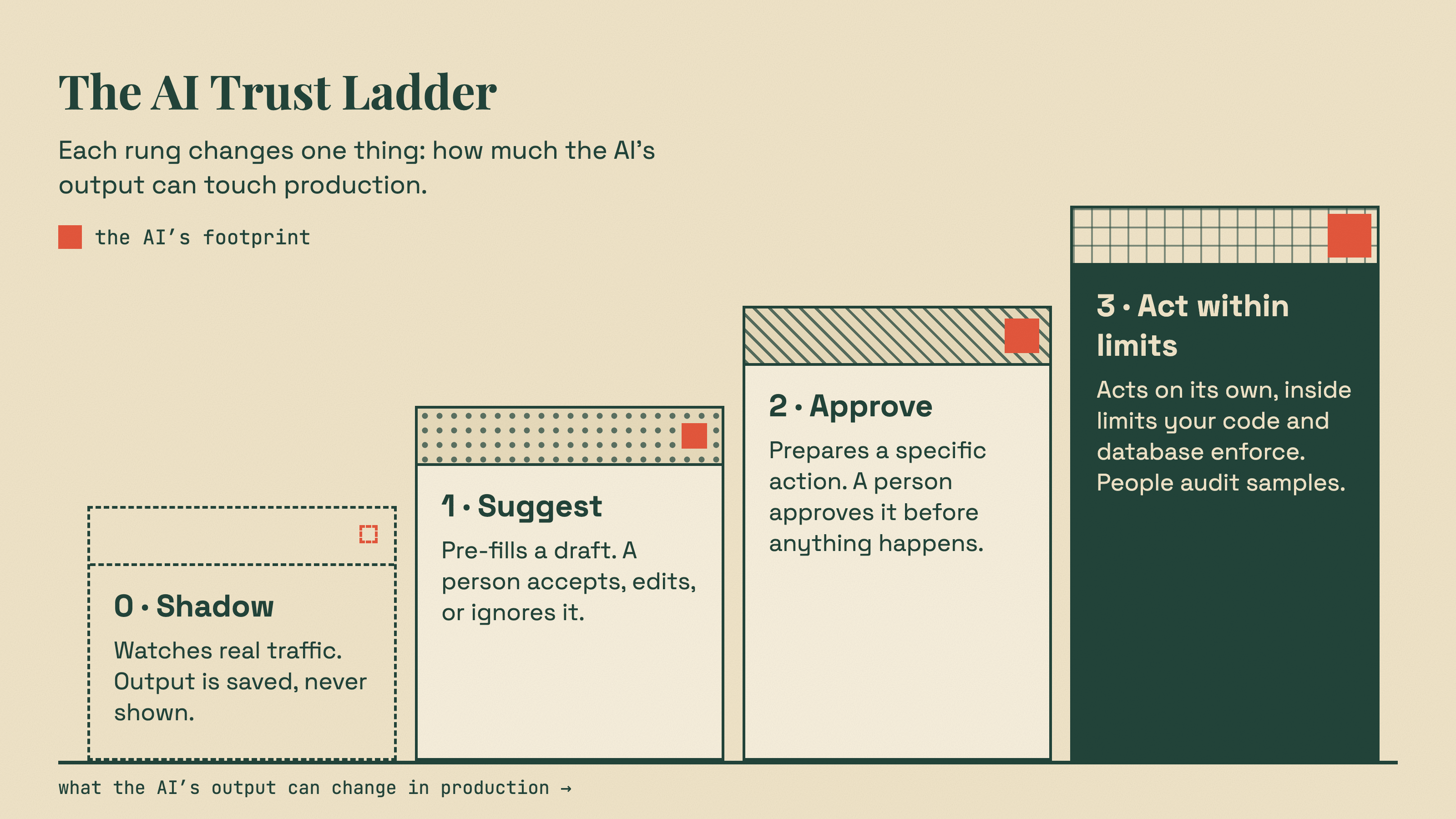
| Level | What the AI does | Who decides | What can go wrong | What earns the next level |
|---|---|---|---|---|
| 0. Shadow | Runs on real traffic. Its output is saved, never shown. | Your existing process, unchanged | Almost nothing user-facing | It agrees with your team's real decisions often enough, in the categories that matter |
| 1. Suggest | Pre-fills a draft or a label. A person accepts, edits, or ignores it. | A person, every time | People trusting it too much | People rarely need to change its suggestions, and you have checked that they are really reading them |
| 2. Act with approval | Prepares a specific action. A person approves before anything happens. | A person, with one click | Approvals turning into rubber stamps | Approvals almost never get overturned, for a well-defined slice of cases |
| 3. Act within limits | Acts on its own, inside hard limits that your code and database enforce. | Your rules, with people auditing samples | Bounded mistakes, caught by limits and audits | You can keep going here; you also need rules for stepping back down |
Two things about this table matter more than the details.
First, each level changes only one thing: how much the AI's output is allowed to touch production. The model, the prompt, and the integration can stay almost the same as you climb. What changes is the consequence of being wrong.
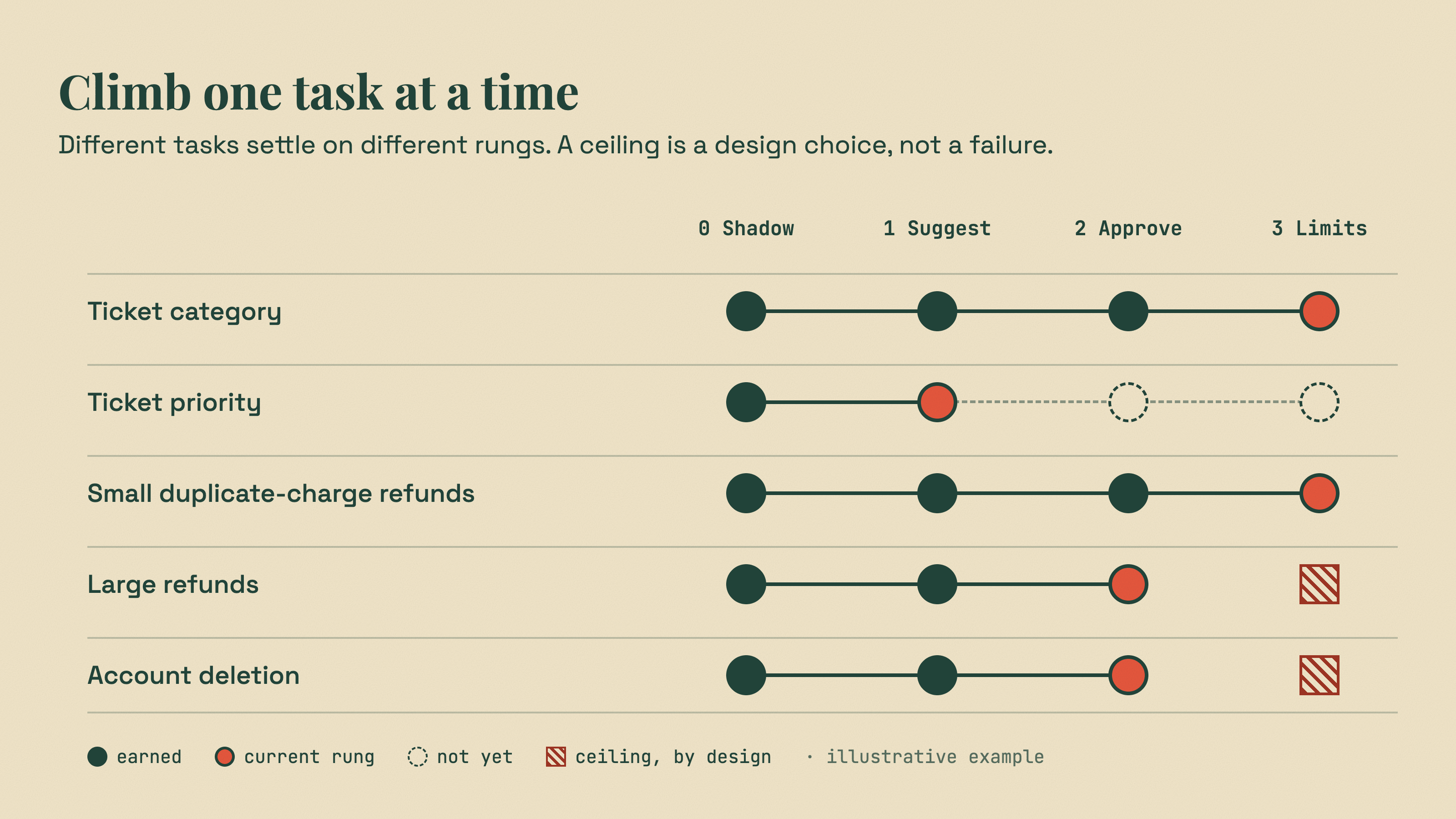
Second, you do not climb the whole ladder for the whole product. You climb it one task at a time, and sometimes one category at a time. "Tag incoming tickets" might reach Level 3 in a month. "Issue refunds" might live at Level 2 forever. That is not failure. That is the ladder doing its job.
How this relates to our other ladder. In Do You Really Need an AI Agent? we described an architecture ladder: one model call, a workflow, a bounded step, an agent. That ladder answers "who controls the execution path?" This one answers a different question: "how much is the output allowed to change production?" You can use both. A single model call can sit at any level of the Trust Ladder.
Why staged trust works (and why it isn't just caution)
None of this is our invention. The ladder borrows from three well-tested ideas.
Levels of automation. Human-factors researchers have argued for decades that automation is not on or off. In a widely cited 2000 paper, Parasuraman, Sheridan, and Wickens wrote that "automation can be applied across a continuum of levels from low to high, i.e., from fully manual to fully automatic." Among the criteria they list for choosing a level are "automation reliability and the costs of decision/action consequences." Those two criteria sit at the heart of this ladder: how often it is right, and how much it costs when it is wrong.
Dark launches and canaries. Software teams already know how to test risky changes on real traffic. Martin Fowler describes a dark launch as a feature that "does all the work it would do when it's released, but nobody can see that it's doing it." Cloud ML platforms ship the same idea as a product: on AWS, in a shadow test, "only the responses of the production variant are returned to the calling application." Google's SRE team defines a canary as "a partial and time-limited deployment of a change in a service and its evaluation." Level 0 is a dark launch. Levels 1 to 3 are canaries for decision-making.
AI-specific guidance says the same thing. OpenAI's practical guide to building agents puts it plainly: "Actions that are sensitive, irreversible, or have high stakes should trigger human oversight until confidence in the agent's reliability grows." On building agents in general, the same guide notes that "customers typically achieve greater success with an incremental approach." The OWASP Top 10 for LLM Applications recommends "human-in-the-loop control to require a human to approve high-impact actions before they are taken."
There is one more reason the ladder works, and it is the one that wins the budget conversation: every level produces data. Level 0 tells you how often the AI agrees with your team. Level 1 tells you how often people change its work. Level 2 tells you how often approvers say no. You are never arguing about whether AI "is ready". You are looking at a number from your own production traffic.
The running example
To keep this concrete, we will follow one feature through every level.
Imagine a B2B software company with a busy support inbox. Agents read each ticket, pick a category (billing, bug, how-to, account access, cancellation), set a priority, and sometimes issue a refund. The company wants AI to take some of that load.
The existing system is ordinary: a web app, a relational database, a background job queue, and a tickets table that has been around for years. Nothing about it was designed for AI. That is the point.
We will use ModelRiver for the AI side in the examples: a workflow holds the model, instructions, and output schema, and your app calls it over HTTP. But the ladder itself is a rollout discipline, not a product feature. We will be clear about which parts ModelRiver handles and which parts stay in your code.
Before Level 0: wire it up without spending a token
Before the AI sees a single real ticket, you want the plumbing to work: the request, the webhook, the database write, the error paths. You do not want to pay for tokens while you debug a JSON parser.
ModelRiver's Test Mode is built for this step. When a workflow is in test mode, it returns the sample data from its structured output instead of calling a provider. There are no provider calls and no token cost, and test traffic is excluded from billable request counts. For async requests, webhooks and backend callbacks still fire, so your full integration runs end to end. Test requests are still logged, and the Test source filter in your request logs shows exactly what your app sent.
Start by defining the output contract. For ticket triage, it might look like this:
Notice the enum values. They should match the values already in your database, not new ones you invent for the AI. If your tickets.category column has six allowed values, the schema should have the same six. Later, when the AI's output starts flowing into real tables, this one decision saves you a whole class of bugs.
ModelRiver validates each response against this schema before returning it. If a model returns something that does not match, that attempt counts as a failure, and the request moves on to your backup model if you configured one. It does not quietly hand you malformed data. (We wrote about why this matters in We Sent the Same JSON Schema to 5 LLM Providers.)
When the plumbing works in test mode, switch the workflow to a real model. Now you are ready for real traffic.
Level 0: Shadow mode
What it is
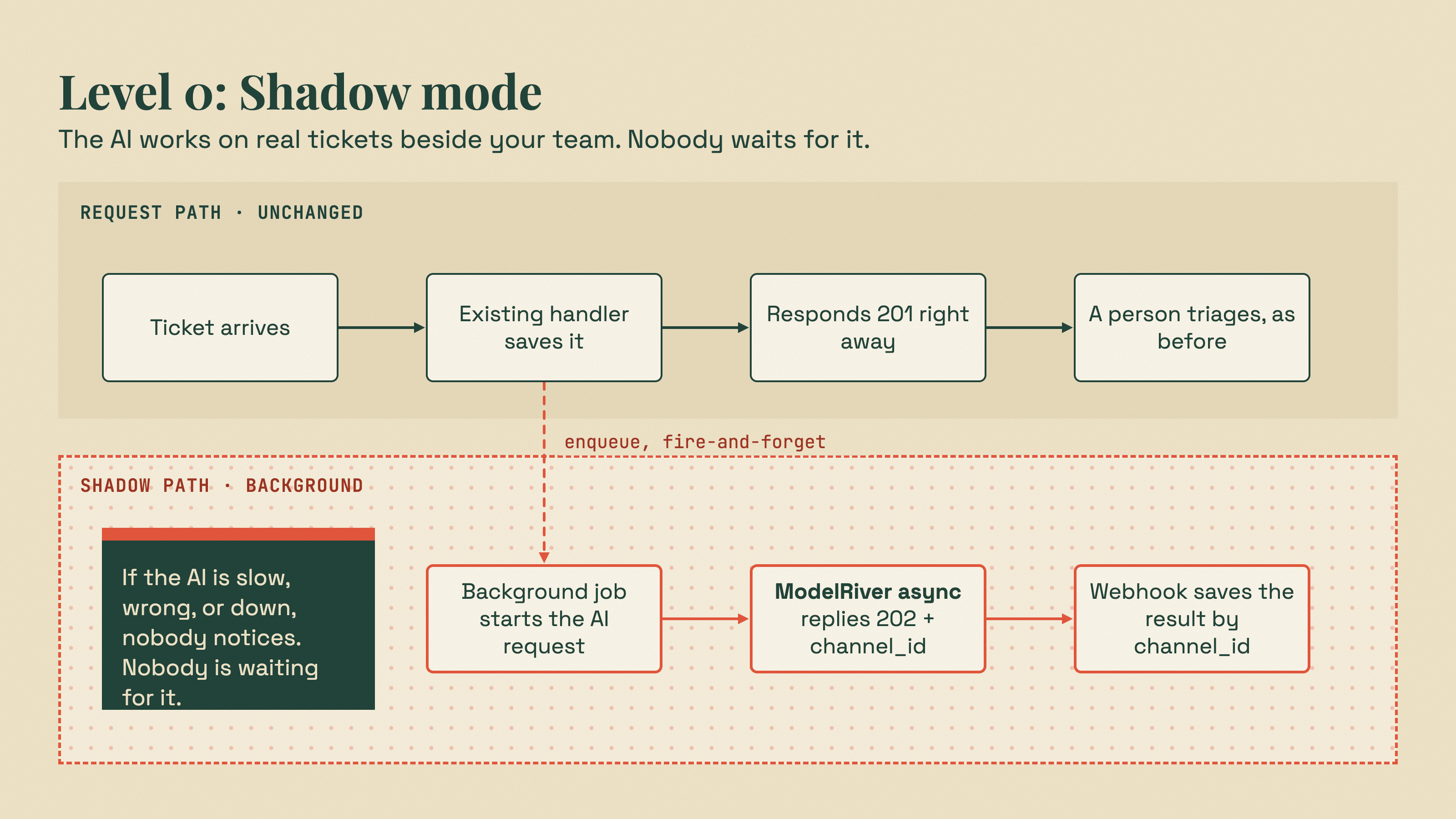
At Level 0, every new ticket still goes through your existing process exactly as before. A person triages it. Nothing changes for customers or agents.
But in the background, the same ticket is also sent to the AI. The AI's answer is saved to a table. Nobody sees it. Later, you compare what the AI said with what your team actually did.
This is the safest possible way to put AI on real traffic. If the AI is slow, wrong, or down, nobody notices, because nobody is waiting for it.
Why real traffic matters
You might ask: why not just test on a sample of old tickets?
You should do that too. But old tickets are not the same as live traffic. Google's ML Test Score paper says it directly: "Offline testing, however extensive, cannot by itself guarantee the model will perform well in live production settings." NIST's Generative AI Profile makes the same point: "Measurement gaps can arise from mismatches between laboratory and real-world settings."
Real tickets have typos, screenshots described in words, three questions in one message, angry customers, and new product names. Shadow mode tests against all of that, for free, without risk.
The one rule of shadow mode
The shadow call must never be able to hurt the request it is shadowing.
That means:
- Do not call the AI inside your user's request and wait for it.
- Do not let an AI error throw an exception into your existing code.
- Do not let an AI timeout hold a database transaction open.
The simplest way to follow this rule in an older codebase is to hand the work to the background job system you already have. Here is what that looks like in a Node.js app. The same shape works in Rails, Laravel, Django, Spring, or .NET.
The /v1/ai/async endpoint responds right away with 202 Accepted and a channel_id. The model runs in the background. When it finishes, ModelRiver sends the result to your webhook.
The channel_id is how you match the answer back to the ticket. Every webhook for the request carries the same channel_id, including error deliveries and retries, so saving it next to the ticket ID is all the correlation you need.
Receiving the answer
Your webhook handler verifies the signature, saves the result, and does nothing else.
Three details make this robust:
- Verify against the raw body. The signature covers the exact text ModelRiver sent. If you parse the JSON first and re-encode it, small differences, such as
4.0becoming4, break the check. The signature verification guide has the same function in Python, PHP, and Ruby. - Upsert on
channel_id. If a delivery fails, ModelRiver retries it. Using the channel ID as a unique key means a retry overwrites the row instead of creating a duplicate. - Save errors too. If every model in the workflow fails, or a spending limit blocks the request, the webhook still arrives with
status: "error"and the samechannel_id. That is useful data. A model that times out on 4% of real tickets is something you want to know before Level 1.
Keep shadow traffic in its own project
This is a small decision with a big payoff. In ModelRiver, webhooks, spending limits, input guardrail settings, and request logs are all scoped to a project. Every async request in a project is delivered to every enabled webhook in that project.
So create a separate project for shadow traffic, with its own API key, its own webhook, and its own spending limit. That gives you:
- A cost ceiling. Set a project spending limit, for example a daily one. When the shadow project reaches it, ModelRiver stops calling models until the next period. Async requests are still accepted with a
202, and each one comes back as an error webhook witherror.type: "project_budget_exceeded". In shadow mode, that is exactly what you want: the experiment pauses, and production is untouched. The limit is checked against recent spend, so a burst of concurrent requests can go slightly over it. - Clean logs. Shadow requests never get mixed into production dashboards.
- No surprise deliveries. Your production webhook handlers never receive shadow events.
One thing a separate project does not separate: shadow requests still count toward your organization's plan request quota. Size the shadow traffic with that in mind.
Think about the data you are sending
Shadow mode sends real customer messages to a model provider. Treat that like any other new data processor: check your agreements, your privacy policy, and what your customers were promised.
Two settings help. You decide what text goes into messages, so strip what the task does not need. The project setting "Save full request and response text" controls whether full prompts and responses are stored in request logs. You can turn it off for the shadow project, so request logs no longer store the full prompts and responses. Two limits to know: webhook delivery logs still record the payloads they send, and the setting cannot be turned off while a workflow in the project uses session memory.
Measuring agreement, honestly
After a week or two, you have something no demo can give you: the AI's answer and your team's answer for the same real tickets. A simple query shows where they line up.
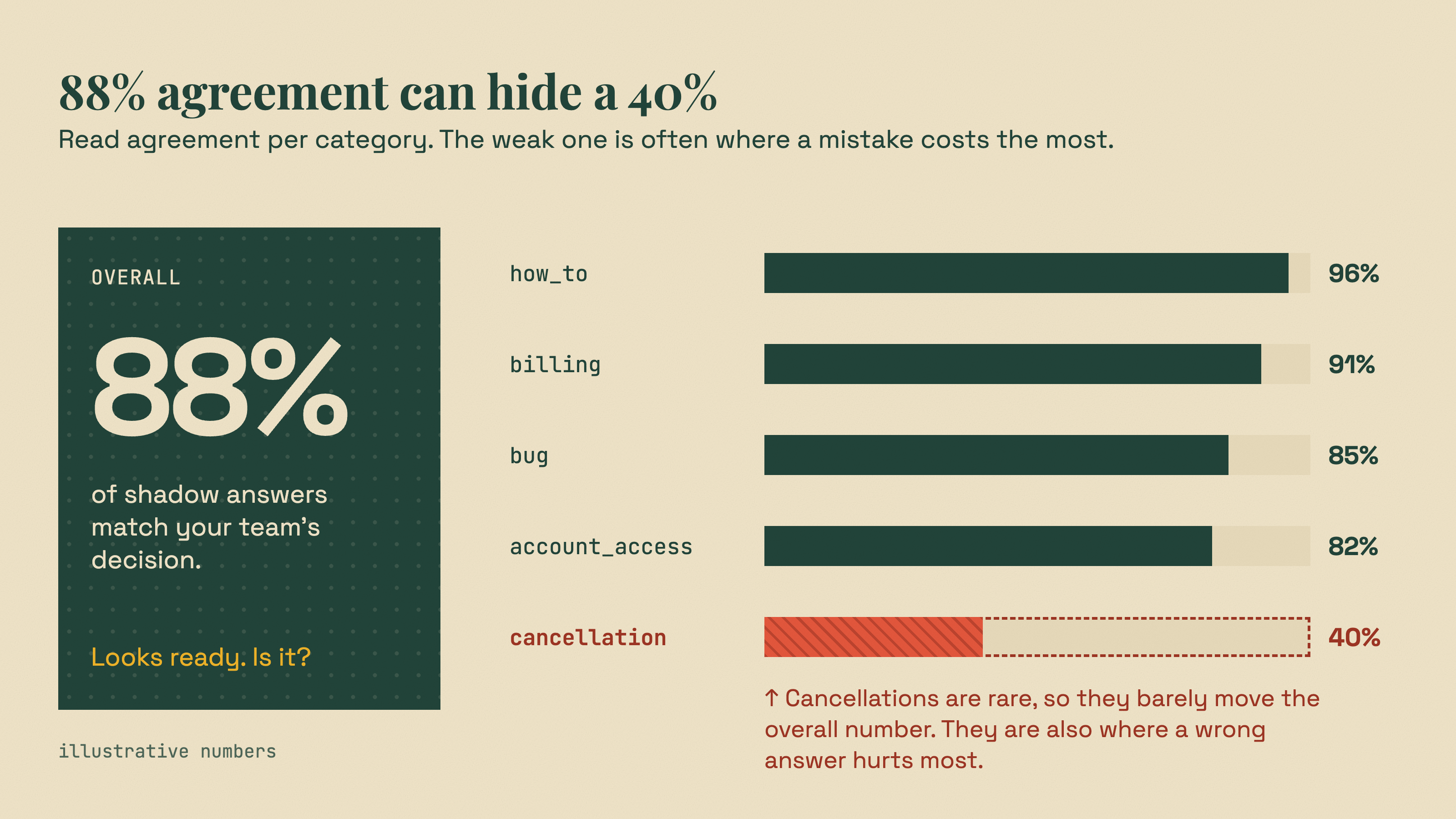
This is a confusion table. Read it like this:
- Look per category, not just overall. "88% agreement" can hide "40% agreement on cancellations". Cancellations are probably where mistakes cost the most.
- Be careful with rare categories. If 90% of tickets are how-to questions, a model that always answers "how_to" looks 90% accurate. Statisticians use measures like Cohen's kappa for exactly this reason: plain percent agreement does not account for agreement by chance. Hamel Husain gives practical advice in his guide on LLM judges: report how often each class is caught, separately.
- Your team is not always right. When the AI and a person disagree, read the ticket. Sometimes the AI is wrong. Sometimes the person was rushed, or your categories overlap. Disagreements are often where you discover that your process itself is unclear.
- Read the examples. Numbers tell you where to look. Reading 50 disagreements tells you why. As Hamel Husain puts it in Your AI Product Needs Evals: "You are doing it wrong if you aren't looking at lots of data."
While you are at it, check your error rate and response times from the same table. They tell you whether this workflow could ever sit in a user-facing path.
Improve without touching production code
You will want to change the prompt, add examples, or try a different model. Workflows have Draft, Live, and History. You edit the Draft, try it against Draft, Live, or older revisions in the Playground, then publish. API traffic always runs the Live revision, so editing the Draft never changes production. If a new version is worse, you roll back to an earlier revision.
Every request log records the workflow revision number that ran, so you can always see which revision produced an answer. To compare revisions in your own queries, store a revision label next to each result. Read it from a runtime config or flag value that you update whenever you publish or roll back, not from an environment variable that only changes on deploy. The label can be off for requests that were in flight during a publish; when you need the exact revision for a specific request, its request log has it. Then "did the new prompt help?" becomes a GROUP BY revision query instead of a debate.
When to leave Level 0
There is no universal number. You set the bar, before you look at the results, based on what a mistake costs. A reasonable promotion rule looks like this:
- Enough real cases in each category you care about, including the rare ones.
- Agreement in each category above a threshold you chose in advance.
- Error and timeout rates low enough that a missing suggestion would be rare.
- You have read the disagreements and understand them.
Write it down before you start. Teams that pick the threshold after seeing the numbers tend to pick whatever number they just got.
Level 1: Suggest
What it is
At Level 1, the AI's answer becomes visible, but only as a suggestion. When an agent opens a ticket, the category and priority fields are pre-filled. The agent can accept them with one click, change them, or ignore them.
A person still makes every decision. What changes is how much typing they do, and what you learn.
The most important design rule at Level 1
When the AI fails, the old experience comes back.
If the AI is slow, down, or returns nothing useful, the agent sees the empty form they have used for years. A missing suggestion should never be an error page.
You can generate the suggestion when the ticket arrives (with the async flow from Level 0, writing into a suggestions table) or when the agent opens it (with a synchronous call). Here is the synchronous version:
Note the check on body.status. When every model in a workflow fails, including the backups, ModelRiver still returns a JSON envelope, often with HTTP 200, but with status: "error" and a list of what each attempt did in meta.attempts. Check the field, not just the HTTP code.
Configure at least one backup model on the workflow, ideally from a different provider. If the primary model has an outage, gets rate-limited, or returns output that fails the schema, ModelRiver tries the backup before giving up. The response tells you which model actually answered in meta.used_provider and meta.used_model, and each failed attempt is logged.
Record what people do with suggestions
This is the data that earns Level 2, and it belongs in your database, next to the ticket. ModelRiver does not have a built-in feedback or rating store, and you would not want one there anyway: the outcome is a business fact about your ticket, so keep it with your other business data.
From this one table you can compute the edit rate per category, per agent, and per workflow revision.
The hidden risk at Level 1: people stop checking
There is a well-studied trap here, and it has a name: automation bias. A systematic review in JAMIA defines it as "the tendency to over-rely on automation." Parasuraman and Manzey's 2010 review found that it "occurs in both naive and expert participants, cannot be prevented by training or instructions." NIST's Generative AI Profile calls out the same "excessive deference to automated systems."
In plain terms: if the suggestion is usually right, people start clicking "accept" without reading. Then your edit rate looks wonderful, and it is lying to you.
Some practical defenses:
- Show the reason, not just the answer. The
reasonfield in the schema exists for this. "Billing: customer mentions being charged twice on invoice #4471" is easier to check than "Billing". - Do not pre-select high-stakes fields. For a low-stakes field like priority, pre-fill it. For a high-stakes one, like "close as cancellation", show the suggestion next to the field and make the person choose.
- Watch for suspicious speed. If an agent accepts suggestions in under two seconds, all day, they are not reviewing them.
- Audit accepted suggestions too. Each week, have someone independently re-triage a small random sample of tickets where the suggestion was accepted unchanged. That is the only way to catch rubber-stamping.
When to leave Level 1
You are looking for a low edit rate, confirmed by audits, in a specific slice of work. Often that slice is narrower than you hoped. "Billing tickets that mention an invoice number" might be ready long before "all tickets". That is fine. Promote the slice, not the feature.
Level 2: Act with approval
What it is
At Level 2, the AI does not just fill in a field. It prepares a specific action, with all the details, and a person approves or rejects it with one click.
In our example: a customer asks for a refund. The AI reads the ticket and proposes, "Refund $42.00 on order 1234, reason: duplicate charge." A support lead sees the proposal with the evidence and clicks Approve. Only then does your backend issue the refund.
This is the pattern OWASP recommends for high-impact actions: a person approves before the action is taken. OpenAI's guide names "authorizing large refunds" as an action that should trigger human oversight. The model proposes, a person approves, your system executes.
Treat the AI's proposal like user input
OWASP's guidance on improper output handling gives the right mental model: "Treat the model as any other user, adopting a zero-trust approach, and apply proper input validation on responses coming from the model to backend functions."
So a proposal goes through three checks before a human ever sees it.
1. The schema. The workflow's output contract limits what the AI can even propose:
ModelRiver enforces enum, minimum and maximum, maxLength, required, and additionalProperties. A proposal of $900 fails validation and never reaches your code as a valid proposal. One honest limit to know about: ModelRiver does not enforce format keywords such as "format": "date" or "format": "email". Validate those in your own code.
2. Your business rules. The schema cannot know whether order 1234 exists, belongs to this customer, or was already refunded. Only your backend knows that.
3. A person. Valid proposals go to an approval queue in your app. Invalid ones go to the same queue marked "AI proposal failed checks: order belongs to another customer". That is useful information for the reviewer, and for you.
How the pieces fit
The flow reuses everything from Levels 0 and 1:
ModelRiver's backend pipeline can also run automated steps between the AI and the final result: the AI drafts, your backend verifies and enriches, and the result flows on to the next step or to the user. We walked through a refund flow like this in Why AI Needs to Call Your Backend More Than Once.
One limit matters for approvals: each pipeline step waits up to 10 minutes for your backend's callback. That is plenty for automated checks. It is not enough for a person who is at lunch. So for human approval, do not hold a pipeline step open. Save the proposal, finish the automated part of the flow, and let the approval live in your own queue for as long as it needs to.
Make execution idempotent
Webhooks are retried when a delivery fails, and people double-click buttons. Your refund code must be safe to run twice.
The simplest way to do that is to make the proposal ID the idempotency key, at the database level:
Notice the last CHECK. Every refund must have either a human approver or a named automatic rule. Your database itself refuses an action that nobody is accountable for.
What to measure at Level 2
- Overturn rate: how often approvers reject or change a valid proposal. Track it by action type, reason code, and amount band.
- Check failure rate: how often proposals fail your business rules. A rising rate often means something changed: a new product, a new refund policy, or a model update.
- Time to approve: if approvals take two seconds each, you are back to the automation bias problem from Level 1. Audit a sample.
When to leave Level 2
Many actions should never leave Level 2. Large refunds, account deletions, anything legal or medical: keep a person in the loop, permanently. That is a good outcome, not a stalled project. The AI still does most of the work; the person still makes the call.
But for a narrow, well-understood slice, such as small refunds for duplicate charges, you may find that approvers essentially never say no. That slice is your candidate for Level 3.
Level 3: Act within limits
What it is
At Level 3, the AI's proposal is executed without a person approving it first, but only inside limits that your systems enforce, and with people auditing a sample afterward.
The key word is limits. Level 3 is not "trust the AI". It is "trust a set of hard boundaries, and let the AI operate inside them".
Build the limits in layers
Each layer catches different mistakes. None of them depends on the model behaving well.
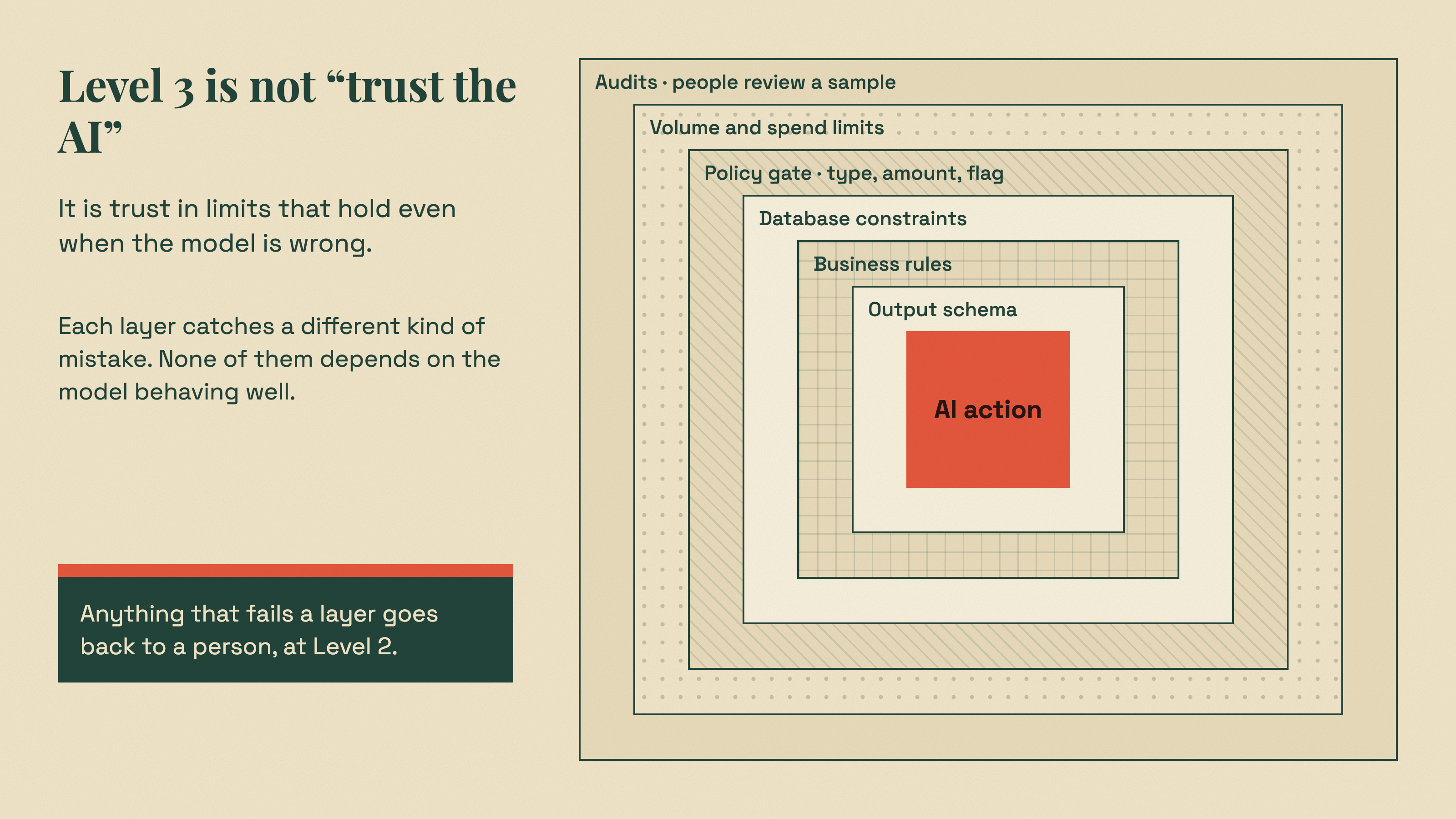
| Layer | Example | What it catches | Where it lives |
|---|---|---|---|
| Output schema | amount_cents maximum, reason_code enum | Invalid or out-of-range proposals | ModelRiver structured outputs |
| Business rules | Order exists, belongs to customer, amount ≤ refundable | Proposals that don't match reality | Your code |
| Database constraints | UNIQUE (ai_proposal_id), CHECK (amount_cents > 0) | Duplicates and impossible values, even if code has a bug | Your database |
| Policy gate | Only duplicate_charge, only under $50, only if the flag is on | Actions outside the slice you proved at Level 2 | Your code |
| Volume and spend limits | Max auto-refunds per hour; project spending limit | Runaway loops and cost spikes | Your code and ModelRiver |
| Audits | A person reviews a random sample of auto-actions | Quiet, systematic errors | Your process |
The policy gate is where the ladder becomes code:
Everything that does not pass the gate falls back to Level 2. So the cost of a too-strict gate is that a person approves something, which is what they did yesterday anyway.
The spending limit is a circuit breaker
In ModelRiver, you can set a project spending limit (hourly, daily, weekly, or monthly) and separate limits for each model slot in a workflow. When the project limit is reached, ModelRiver stops calling models: /v1/ai returns a 402, and /v1/ai/async delivers an error webhook with error.type: "project_budget_exceeded". When a model slot's limit is reached, that slot is skipped and the next backup is tried.
At Level 3 this matters for a reason beyond cost. If a bug makes your app send the same ticket to the AI a thousand times, the spending limit stops the loop even if nobody is watching. Pair it with your own volume limit on actions, because the AI being cheap does not mean the refunds are.
The kill switch
NIST's AI Risk Management Framework asks for "mechanisms … to supersede, disengage, or deactivate AI systems that demonstrate performance or outcomes inconsistent with intended use." Pete Hodgson's article on feature toggles has a friendlier name for the same thing: "long-lived 'Kill Switches'".
At Level 3 you want two of them:
- A feature flag (
ai_auto_refundsabove) that sends everything back to the approval queue instantly. Your feature flag system already does this; use it. - A workflow rollback. If a prompt or model change caused the problem, roll the workflow back to the previous Live revision. Production picks up the earlier configuration without a code deploy.
Practice both before you need them.
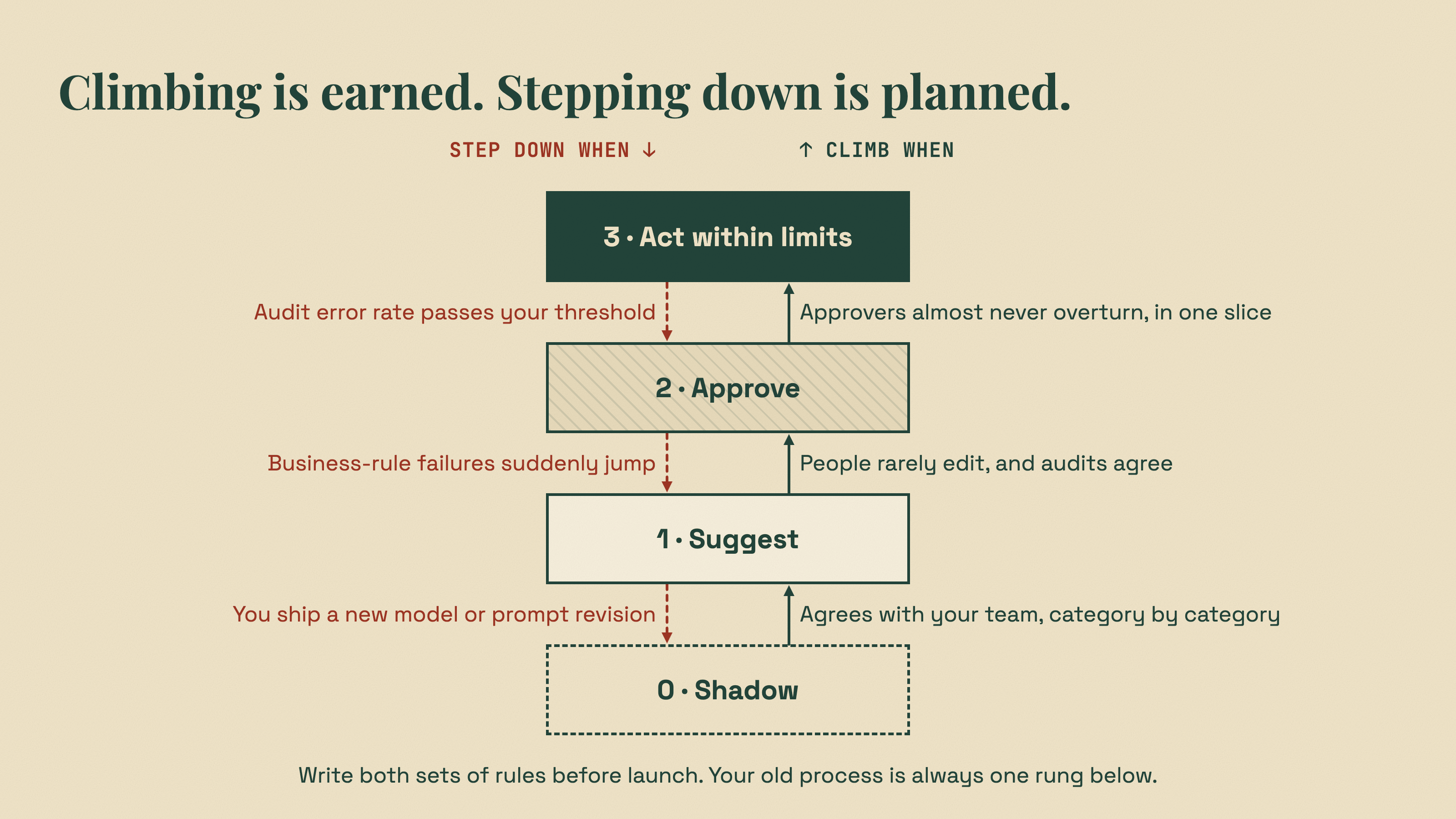
Step down automatically
Promotion rules are only half the system. You also need demotion rules, written down before launch:
- If the audit error rate for auto-refunds goes above your threshold, turn off the flag.
- If the business-rule failure rate jumps, turn off the flag and investigate.
- If you change the model or publish a new prompt revision, consider dropping back a level until the new version earns trust again.
That last one surprises people. But a new model is a new decision-maker. As we showed in LLM Failover in Production, the same prompt on a different model can behave like a different product.
What ModelRiver handles, and what stays in your code
We want to be precise about this, because overclaiming here would be the opposite of the point of this article.
| Need | ModelRiver | Your app |
|---|---|---|
| Call models over HTTP without blocking your app | Async requests, webhooks, WebSocket delivery | Enqueue the job, handle the webhook |
| Guarantee the output shape | Structured outputs, validated before they are returned; schema failures trigger failover | Validate format fields and anything that needs your data |
| Survive provider outages | Primary plus up to two backup models, with each attempt logged | Show the old experience when everything fails |
| Change prompts and models safely | Draft, Live, History, publish, rollback; revision number on every request log | Store the revision with each result |
| Wire it up without spending tokens | Test Mode with sample data, webhooks, and callbacks | Write the integration once |
| Cap cost | Project and per-model spending limits | Volume limits on actions |
| Screen harmful input | Input guardrails for categories like violence and self-harm: block, log only, or off (minors protection always stays on) | Defenses against prompt injection, such as narrow schemas and no unnecessary tools |
| Correlate results | The same channel_id on the 202 response and every webhook delivery | Store the channel_id with your record |
| Compare AI with human decisions | Not built in | Your shadow results table and queries |
| Approval queue | Not built in | Your app, your UI, your audit trail |
| Feedback and edit tracking | Not built in | Your outcomes table |
| Percentage rollouts and A/B tests | Not built in | Your feature flag system |
The bottom half of that table is on purpose. Approvals, feedback, and rollouts are about your business decisions, and they belong next to your data, in the systems your team already trusts. A gateway's job is to make the AI part boring and dependable, so all of your attention can go to those decisions.
A rollout plan you can take to your team
Here is the whole ladder as a checklist.
Week zero: decide before you measure
- Pick one task, not a whole feature. "Ticket category", not "AI support".
- Write down what a wrong answer costs, per category.
- Write the promotion and demotion rules for each level, with thresholds.
- Decide who owns the numbers, and who can pull the kill switch.
Before Level 0
- Define the output schema, using the same enum values as your database.
- Create a separate project for shadow traffic, with its own key, webhook, and spending limit.
- Build the integration in Test Mode, and check the error paths.
Level 0: Shadow
- Fire AI requests from your background jobs, never from the user's request path.
- Save each request's
channel_idwith its ticket, and every result, including errors, keyed bychannel_id. - Compare against human decisions per category. Read the disagreements.
Level 1: Suggest
- Show suggestions with reasons. On failure, show the old experience.
- Record what people accept, edit, or ignore, with the workflow revision.
- Audit a sample of accepted suggestions for rubber-stamping.
Level 2: Approve
- Validate proposals with the schema, then your business rules, before a person sees them.
- Keep human approval in your own queue, not in an open pipeline step.
- Make execution idempotent at the database level.
Level 3: Limits
- Gate automatic actions by type, amount, volume, and a feature flag.
- Set spending limits as a circuit breaker.
- Audit a random sample of automatic actions, and demote on bad results.
The point of the ladder
The ladder's goal is not to slow AI down. It is to replace a scary, all-or-nothing decision with a series of small ones, each backed by evidence from your own production traffic.

You start where it is safe, with AI watching quietly beside your team. You let it help where it has earned it. You give it real responsibility only in the places where the numbers say it deserves it, inside limits that do not depend on it behaving well.
And at every step, if something looks wrong, you step back down one rung. Nothing breaks. Nobody gets paged. Your old process is still there, because you never removed it.
That is how you add AI to a product people already depend on, without betting the company on it.
Next steps
- Test Mode: build and check your integration without spending tokens
- Backend pipeline: async requests, webhooks, and callbacks
- Structured outputs: define the contract your AI output must follow
- Workflow releases: Draft, Live, History, and rollback
- Spending limits: project and per-model cost caps
- Input guardrails: screen harmful input before it reaches a provider
Further reading
- Parasuraman, Sheridan & Wickens, A model for types and levels of human interaction with automation, IEEE Transactions on Systems, Man, and Cybernetics (2000)
- Parasuraman & Manzey, Complacency and bias in human use of automation, Human Factors (2010)
- Goddard, Roudsari & Wyatt, Automation bias: a systematic review, JAMIA (2012)
- Breck et al., The ML Test Score, Google (2017)
- Martin Fowler, Dark Launching (2020)
- Pete Hodgson, Feature Toggles (aka Feature Flags) (2017)
- Google SRE Workbook, Canarying Releases
- AWS, Shadow tests in Amazon SageMaker AI
- NIST, AI Risk Management Framework 1.0 (AI 100-1) and Generative AI Profile (AI 600-1)
- OWASP, LLM06:2025 Excessive Agency and LLM05:2025 Improper Output Handling
- OpenAI, A practical guide to building agents (2025)
- Anthropic, Building effective agents (2024)
- Hamel Husain, Your AI Product Needs Evals and Using LLM-as-a-Judge for Evaluation