
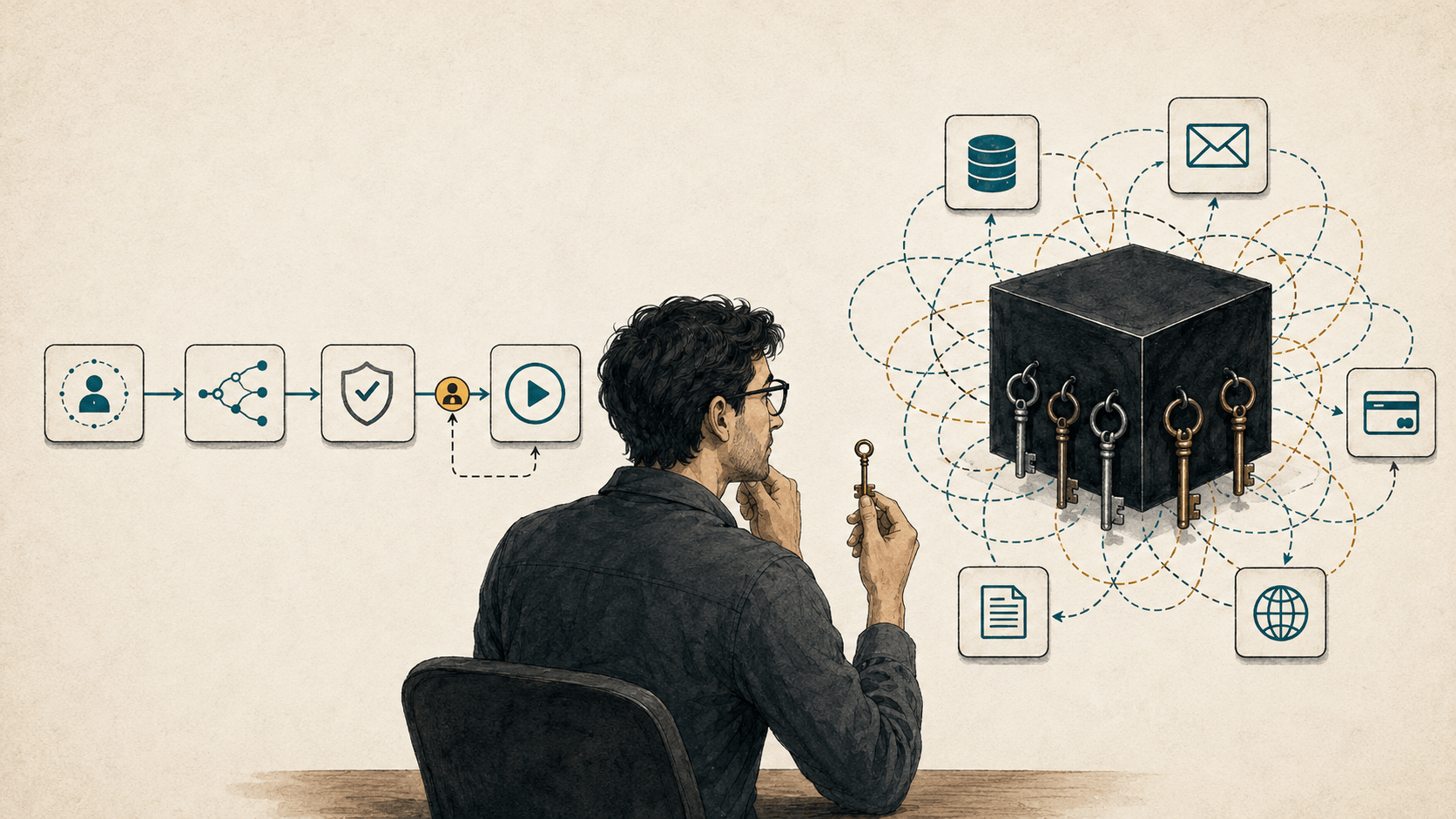
The demo was magical. The architecture diagram was terrifying.
There is a moment in many AI projects when excitement quietly turns into unease.
The demo works. A user writes one sentence, the model chooses a tool, looks up some data, calls another tool, and returns a polished answer. For a few minutes, it feels as if software has crossed a line. We are no longer programming every step. We are describing an outcome and watching the machine find its way there.
Then someone asks a painfully ordinary question:
What happens when it chooses the wrong tool?
The room gets quieter.
Soon there are more questions. What can it read? What can it change? How many times can it retry? Can it send an email without approval? If a customer writes instructions inside a support ticket, can those instructions influence the agent? How will we reproduce a failure that took a different path every time?
The first instinct is usually to add another prompt, another guardrail, another evaluator, or another agent to supervise the first one. Sometimes that is justified. But sometimes the uncomfortable answer is simpler:
We did not need an agent in the first place.
We needed an application that used AI for the parts requiring judgment and ordinary code for everything else.
AI Agents vs Workflows: What's the Difference?
The word agent has become loose enough to mean almost any application with a language model in it. That makes architecture discussions unnecessarily confusing.
“Agent” should describe an architecture, not an ambition.
A useful distinction comes from Anthropic's guide to building effective agents:
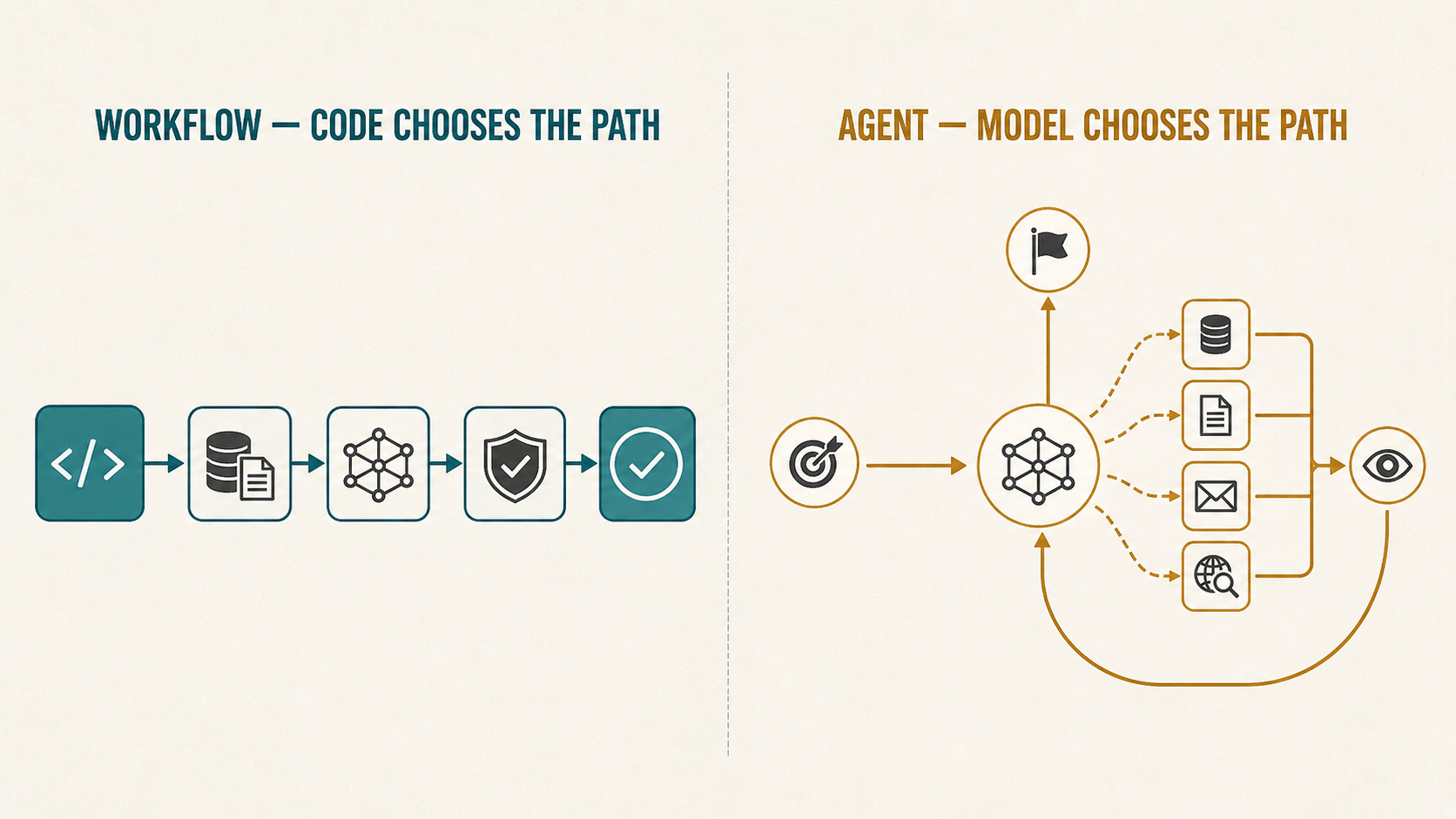
- In a workflow, code determines the sequence in which models and tools are used.
- In an agent, the model determines its own process and decides which tools to use as the task unfolds.
OpenAI makes a similar distinction in its practical guide to building agents: an application that uses an LLM but does not let the LLM control workflow execution is not, by that definition, an agent.
This is not a debate about labels. It is a decision about who controls the next step.
Application-controlled workflow: Code → approved context → model → validation → code decides next step
Agent-controlled workflow: Goal → model decides → tool → observation → model decides again
Both can be valuable. They solve different problems.
The mistake is treating the second architecture as an automatic upgrade from the first.
Consider a support ticket
Imagine a customer writes:
I was charged twice for order 4821. Can you fix this?
An autonomous design might give an agent access to customer records, orders, payments, refunds, email, and internal policies. The agent reads the message, decides what to inspect, chooses whether to refund a payment, and sends a reply.
That looks elegant in a diagram because the entire system can be represented by one large box labelled Agent.
The box is hiding nearly every decision that matters.
For this particular task, the application already knows a great deal:
- The order number must be extracted from the message.
- The order and its transactions must be fetched.
- Duplicate-charge policy must be checked.
- A refund may require approval or a deterministic policy decision.
- The customer needs a reply based on what actually happened.
Only some of those steps require language understanding. A smaller design could look like this:
The model still does meaningful work. It interprets messy language and writes a considerate response. But it never receives a master key to the application. It sees the information needed for its current task, and its output is treated as a proposal with a defined shape—not as permission to do anything it can imagine.
That distinction can feel less futuristic. It is also much easier to trust at 2 a.m. when a customer says your system moved their money incorrectly.
Simpler does not mean “less AI”
There is a strange pressure in AI product development to maximize how much the model controls. If the application chooses the tools, perhaps it is not intelligent enough. If a backend rule approves the refund, perhaps we have failed to be agentic.
But autonomy is not the product. A solved user problem is the product.
An LLM can classify an ambiguous request, extract fields from an inconsistent document, compare two explanations, summarize evidence, or draft language that sounds natural—all inside a workflow your application controls. You do not lose the model's reasoning ability because your code decides what happens next.
In fact, constraints often make that reasoning more useful. The model receives cleaner context. It has a narrower question. Its response can be validated against a schema. When it fails, the team knows which step failed and what information the model saw.
Good engineering is not measured by the freedom given to a component. It is measured by whether the whole system behaves well.
Every unit of autonomy creates an autonomy tax
Giving a model control can remove orchestration code, but the complexity does not disappear. It moves into runtime behavior, where it is harder to see.
The path becomes part of the output
In a fixed workflow, you can enumerate the important routes. A request may be approved, rejected, or escalated. Each path can have tests, permissions, timeouts, and an owner.
In an agent, the sequence of tool calls is generated. Two similar requests may take different routes. The final answer is not the only output you must evaluate; the path taken to produce it matters too.
This is one reason agent evaluation is difficult. Final-answer accuracy alone does not capture cost, robustness, or reproducibility. A system that reaches the right answer through an expensive or fragile path may look good in a benchmark and still be a poor product.
Failures multiply across steps
As a simple illustration rather than a reliability model, suppose each step has a 95% chance of behaving acceptably. That sounds reassuring. Across ten successive steps, however, the chance that every step behaves acceptably is only about 60%, assuming independence.
Real failures are not independent, so this is not a reliability forecast. It is a reminder: long chains compound uncertainty. Tool errors, ambiguous responses, stale context, retries, and mistaken assumptions can travel forward into later decisions.
A workflow also has multiple steps, but it can place deterministic checks between them. The next action does not have to inherit the model's confidence.
Cost and latency become variable
A workflow can often tell you its maximum number of model calls before it starts. An agent may search, reflect, retry, call a tool, revise its plan, and search again.
That flexibility is sometimes exactly why an agent succeeds. It also makes budgets and response times harder to predict. The honest comparison is not “one workflow call versus one agent call.” It is the complete distribution of attempts, tokens, tool calls, failures, and completion time.
Permissions become an architectural problem
An agent cannot use a tool without being granted access to it. The larger its toolset and permissions, the larger the consequence of a bad decision or manipulated input.
OWASP calls this risk Excessive Agency and identifies three common causes: excessive functionality, excessive permissions, and excessive autonomy. Its guidance is refreshingly practical—minimize tools, minimize their functionality and permissions, and require approval for high-impact actions.
This principle is useful far beyond security:
Give the model the smallest amount of autonomy required to solve the problem.
Not zero autonomy. Not maximum autonomy. The smallest amount that earns its keep.
What should you build?
The practical question is not whether one architecture is more advanced. It is which architecture gives the application enough flexibility without adding control that the task does not need.
| Problem | Recommended architecture |
|---|---|
| Simple generation, extraction, or classification | Single model call |
| Predictable process with several known steps | Application-controlled workflow |
| Model needs external information or one approved action | Tool call selected and scoped by the application |
| Fixed tools must run in a controlled sequence | Orchestrated workflow |
| Dynamic planning and tool selection are essential | Agent |
| Several independent objectives genuinely benefit from coordination | Multi-agent system |
Move up in complexity only when the previous level stops solving the problem.
Structured output is usually a contract inside one of these architectures, not a separate level of autonomy. Tool calling is similar: allowing a model to fill the arguments for one approved function is very different from allowing it to choose freely among dozens of tools.
Start with the smallest system that can work
The table above is a detailed chooser. The four-level ladder below groups those choices by who controls execution: one model call, an application-controlled workflow, a bounded model-directed step, or a full agent. Stop as soon as a level solves the problem reliably.
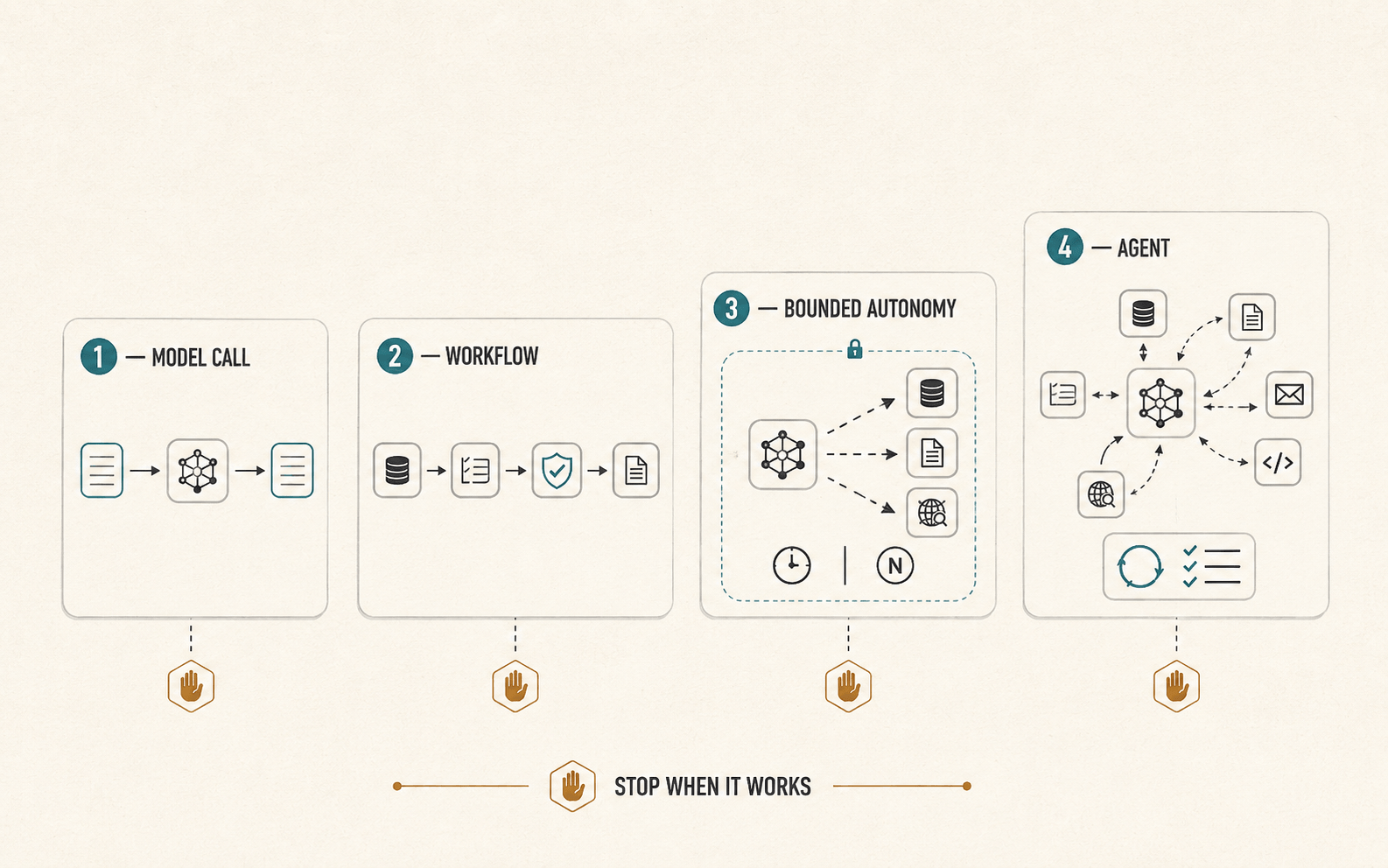
Level 1: One model call
Use one call when the task is transformation rather than execution: classify a message, extract structured data, summarize a document, generate alternatives, or draft a response.
Add retrieval or examples before assuming the task requires an agent. Anthropic's guide notes that, for many applications, a single optimized call with retrieval and in-context examples is enough. If model choice is still uncertain, compare behavior before changing the architecture; the experiments in Same Model, Same Prompt, Different Answer show why one successful run is not enough evidence.
Level 2: An application-controlled workflow
Use a workflow when the steps are known but one or more steps benefit from language understanding or reasoning.
Your application gathers context, calls the model, validates the response, performs approved actions, and chooses the next step. This is a strong default for document processing, content moderation, lead qualification, support triage, onboarding, and many internal operations. A reusable workflow and a structured output contract can keep the model configuration separate from the application logic without giving the model control of execution.
Level 3: A bounded model-directed step
Sometimes the application knows the overall workflow but not the best way to complete one part. Let the model choose among a small set of read-only tools, search until it has enough evidence, or revise an answer against a rubric. This is also where understanding the trade-offs of LLM and agent frameworks becomes useful.
This is a hybrid architecture. It places autonomy inside a boundary with a call limit, a time limit, scoped credentials, and an explicit exit condition.
Hybrid systems are not a compromise to be embarrassed about. They are often the most mature design: deterministic where correctness matters, adaptive where uncertainty is real.
Level 4: An agent
Use an agent when the route genuinely cannot be specified in advance, the environment provides useful feedback, and the value of adaptation exceeds the added cost and risk.
Coding is a good example. An agent can inspect an unfamiliar repository, form a plan, edit files, run tests, learn from failures, and try again. The exact path depends on what it discovers, while automated tests provide an unusually strong feedback signal.
Open-ended research can also justify agentic behavior because promising sources and follow-up questions cannot always be predicted beforehand. Even there, the agent benefits from boundaries: approved sources, citation requirements, spending limits, and human review before consequential use.
Don't use an agent when
- The task follows a predictable sequence.
- You already know which tools are required.
- The number of steps is small and bounded.
- Application logic can enforce the process reliably.
- A wrong action would be costly and independent verification is unavailable.
Consider an agent when
- The next useful action cannot be predicted in advance.
- The system must choose tools dynamically as it learns.
- The task requires iterative planning and revision.
- The environment provides feedback the model can use to recover.
- The extra flexibility creates measurable value despite higher cost and complexity.
Five questions to ask before building an agent
1. Can we describe the successful path before the request begins?
If yes, encode that path in software. Do not ask a probabilistic model to rediscover a process your team already understands.
2. Which decisions genuinely require judgment?
Circle the places involving ambiguity, unstructured information, or trade-offs. Use the model there. Keep identity checks, permissions, arithmetic, policy enforcement, and irreversible operations in ordinary code whenever possible.
3. What is the cost of a wrong action?
Recommending the wrong article and issuing the wrong refund are not equivalent. As consequences rise, reduce permissions, add independent validation, and move approval outside the model.
4. Can the system tell whether it succeeded?
Agents are strongest when the environment gives useful feedback: tests pass, a query returns a result, a file compiles, or a human approves the outcome. “The answer sounds convincing” is a weak stopping condition.
5. How will we reconstruct one bad run?
Before launch, imagine a real user reporting harm three weeks later. Can you recover the input, context, model version, tool calls, intermediate outputs, approvals, and final action? If not, the system is not ready for more autonomy.
What this looks like in practice
At ModelRiver, we see this distinction when teams compare models and providers: the model is only one part of the system. The surrounding workflow often determines whether an agent is actually necessary. ModelRiver's workflows and backend pipelines support the same separation—models handle language and bounded judgment, while application code remains responsible for trusted logic and consequential actions.
The support-ticket example from earlier can become an explicit exchange:
The model does not need unrestricted access to orders, payments, policies, and email. A structured response tells the backend what the model understood. The backend verifies the facts, applies permissions and business rules, performs an approved action, and returns the confirmed result when another model step is useful.
For longer processes, a multi-step backend pipeline lets AI and backend steps take turns without making the model the authority over the whole system. Why AI Needs to Call Your Backend More Than Once follows this pattern through a complete refund example.
That is one implementation of the broader principle in this essay: keep the application in control, and place AI precisely where language or judgment creates value.
Build the boring version first
“Boring” is often used as an insult in technology. I have started to hear it as a compliment.
A boring system tells you what it will do. It has narrow permissions. Its failure states have names. A new engineer can draw it on a whiteboard without using a cloud labelled “AI magic.” When the model behaves strangely—and every model eventually will—the application still knows where the boundaries are.
This does not mean we should stop experimenting with agents. Their ability to navigate uncertain tasks is real and improving. It means autonomy should be introduced as a response to demonstrated need, not as decoration added to an architecture.
Build the workflow. Observe where it becomes rigid. Measure the cases it cannot handle. Then give the model freedom exactly there.
The goal is not to keep AI on a short leash forever. The goal is to know why you are letting go.
Build the simplest architecture that works
Before adding an agent, validate the simplest approach first. Comparing models and testing a real workflow can reveal whether you need a model call, a controlled pipeline, bounded tool use, or genuine agent autonomy.
ModelRiver helps teams access and experiment with AI models across providers from one platform.